
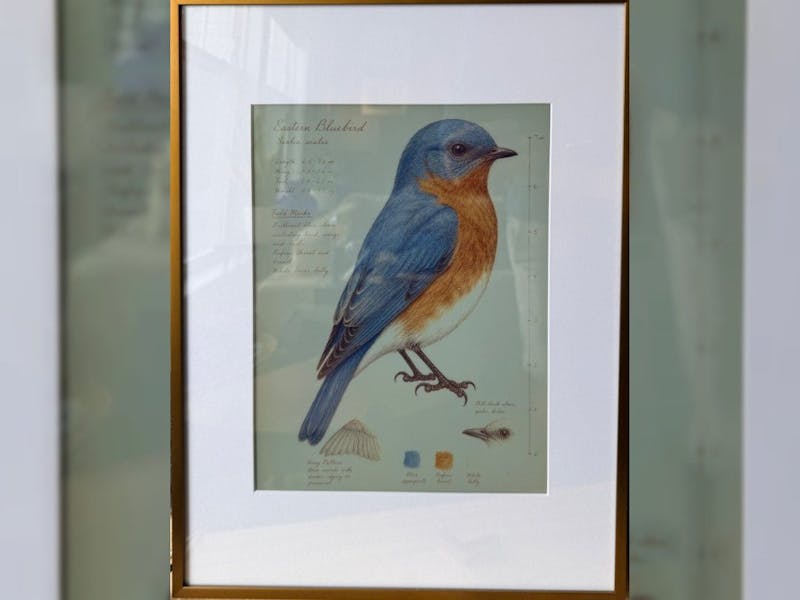
Ambient displays are having a moment. Instead of another glowing rectangle demanding attention, makers are building frames that sit quietly on a wall and refresh only when something changes. Six-color e-paper is the enabler here, and the Inky Bird Frame is one of the sharpest examples of the trend: a picture frame that quietly swaps in vintage field-guide illustrations of the birds actually being spotted around your neighborhood.
The build itself
The project splits into two halves. A controller watches observation feeds like iNaturalist, eBird, and BirdWeather within a distance and time window you set. When a new species turns up, it checks a local catalog; if there is no plate for that bird yet, it pulls licensed reference photos, generates a field-journal illustration, reviews the result, and caches it permanently so it never regenerates. Behind the frame, a Raspberry Pi Zero 2 W downloads approved plates, checks them against stored checksums, and pushes them to the display.
Technical takeaway
The screen is a Pimoroni Inky Impression 13.3-inch panel running at 1600 x 1200 pixels across six colors, driven over the Pi’s SPI header. Keeping the heavy work off the wall unit is the smart part: the controller can live on a Raspberry Pi 4 or 5, a spare Linux or macOS box, or a Docker container, while the Pi Zero 2 W does nothing but fetch and render over your LAN. Rotation options range from sequential to a shuffle-bag algorithm that guarantees every cached bird appears once before any repeat. If you are sourcing parts, note the Inky Impression uses the full 40-pin GPIO header, so plan your standoffs before you mount it in a frame.
What to try next
The same controller-plus-e-paper split works for far more than birds. Point the observation window at a weather API for an ambient forecast plate, or at your own home-automation MQTT topics for a status board that only redraws when a sensor trips. The full installation guide, bill of materials, and shared illustration catalog live in the project’s write-up on Hackster.io, and the GitHub repository has everything you need to flash a Pi Zero 2 W and start cataloging your local flock this weekend.
Frequently Asked Questions
What hardware does the Inky Bird Frame use for its display?
A Pimoroni Inky Impression 13.3-inch six-color e-paper panel at 1600 x 1200 pixels, driven by a Raspberry Pi Zero 2 W over the Pi’s SPI/GPIO header. The controller half can run on a Raspberry Pi 4 or 5, a Linux/macOS machine, or in Docker.
How does it decide which bird to show?
A controller polls observation feeds like iNaturalist, eBird, and BirdWeather within a distance and time window you configure. New species trigger a cached illustration or a freshly generated field-journal plate, and a shuffle-bag rotation makes sure every cached bird is shown before any repeat.
What will I learn if I build this?
You’ll practice splitting a project across two networked devices, driving a large e-paper panel over SPI from a Raspberry Pi, verifying downloads with checksums, and wiring an external data feed into a physical display. Those skills carry straight over to any ambient dashboard or IoT status board.
