
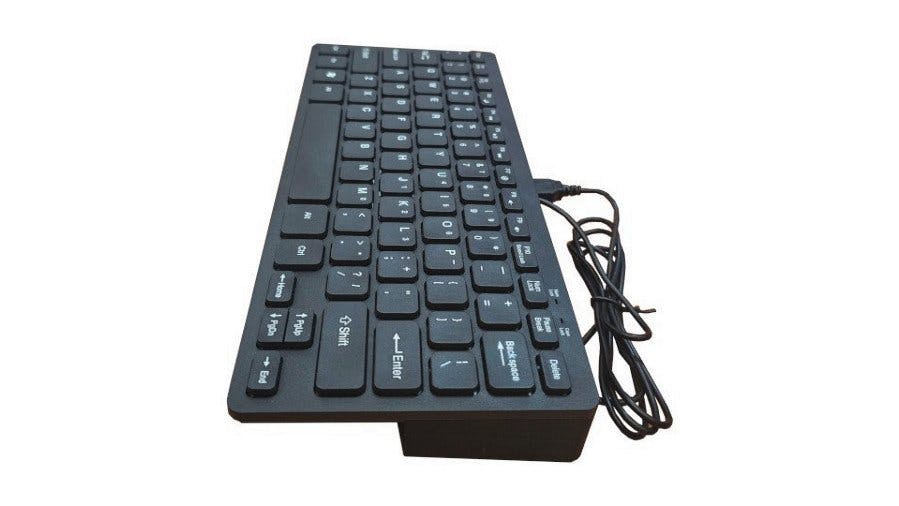
A genuine Western Design Center W65C02 sits under the keys of a 50-euro computer that boots straight into Apple II games. Olimex has launched the Neo6502kbd, a wedge-format machine shaped after the 1977 Apple II, and it runs an actual 8-bit 6502 instead of emulating one on top of a Linux board.
An Apple II silhouette with modern ports
Olimex founder Tsvetan Usunov has been working this design since April 2023. The original Neo6502 was a low-chip-count single-board computer that handed most of the classic support silicon over to a Raspberry Pi RP2040. A Neo6502PC followed with a built-in screen and roughly three hours of battery. The kbd version inverts that: the board now lives inside the keyboard, and you bring your own display, exactly as Apple did nearly fifty years ago.
It emulates the Apple II and the Oric Atmos, so Karateka and Lode Runner run on an HDMI monitor with no CRT involved. Games are only half the story. The toolchain covers CP/M, ProDOS, BASIC, Pascal, C, assembler, and Forth, which makes this a credible teaching machine for a computer architecture unit where students should be staring at registers and a memory map rather than a Python abstraction.
What sits on the board
- WDC W65C02 processor, 6502-compatible, executing real 8-bit code
- RP2040 handling video, storage, and I/O duties
- Four USB host ports for peripherals
- DVI/HDMI video output
- UEXT header for an optional Wi-Fi module
- USB Type-C for both power and programming
The RP2040 pairing is the clever engineering call here. Rather than hunting down scarce 1980s video and glue chips, Olimex assigns those jobs to a cheap dual-core microcontroller and keeps the CPU authentic. Schematics and KiCad sources were not published at launch, but Olimex has committed to releasing them under the strongly reciprocal variant of the CERN Open Hardware Licence.
Build it yourself
No soldering required to start: the Neo6502kbd ships assembled at 50 euros, about 58 US dollars, from the Olimex store, and a USB-C phone charger plus any monitor gets you a boot prompt. One gotcha worth knowing is that the video path is DVI signalling over an HDMI connector, so a panel that insists on full HDMI audio handshaking can refuse to sync; a DVI-tolerant monitor is the safer pick for a lab bench. From there the UEXT header exposes I2C and UART pins, the same way you would hang an SD logger off an Arduino, so a thesis group can bolt sensors onto a machine whose entire memory map fits on one page. Start with a short BASIC listing, move to the 6502 assembler, then to C once the addressing modes stop feeling strange. Full launch details are on Hackster: https://www.hackster.io/news/olimex-launches-the-apple-ii-inspired-open-hardware-neo6502kbd-retro-wedge-computer-f66ea58a5e03
Frequently Asked Questions
What processor does the Neo6502kbd actually run?
A genuine Western Design Center W65C02, which is pin- and instruction-compatible with the MOS 6502. It is not emulation. A Raspberry Pi RP2040 sits alongside it to handle DVI/HDMI video, storage and USB host duties, jobs that would otherwise need scarce 1980s support chips.
How much does it cost and what else do I need to buy?
The Neo6502kbd is 50 euros, roughly 58 US dollars, from the Olimex store, and it ships assembled. Budget for a monitor and a USB-C charger. Prefer a DVI-tolerant panel, since the video path is DVI signalling over an HDMI connector and some HDMI-only monitors refuse to sync.
What will I learn if I build a project around this?
You get direct exposure to 6502 assembly, addressing modes, and a memory map small enough to hold in your head, which is exactly the groundwork most ECE curricula try to teach through diagrams. The UEXT header brings out I2C and UART pins, so you can wire real sensors and practise bare-metal register work that transfers straight to AVR and ARM microcontrollers.
