
Wi-Fi drops the moment your sensor node ends up in a basement, behind a metal cabinet, or in a school lab where a hundred phones are fighting for the same channel. A cable fixes that, and Olimex just made the cable option cost about 5 euros. Treat it as a weekend hack: one small board, one ESPHome config, one wired relay or sensor that stays online.
What Olimex built
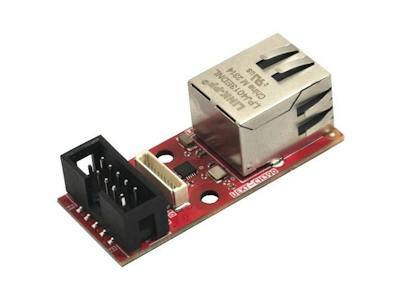
The UEXT-CH390 is a 50×21 mm open-hardware add-on that gives a microcontroller board 100 Mbit Ethernet over SPI, using the WCH CH390 controller. It carries both the classic UEXT connector and the smaller 1.0 mm pUEXT, so Olimex boards plug in with no soldering. ESPHome already supported the CH390 on ESP32 chips. Olimex wrote the missing piece for the Raspberry Pi RP2040, so a Pico-class board can now report to Home Assistant over a cable. There is also a plain Pico SDK example with lwIP and a tiny web server if you want to skip ESPHome. The write-up is on Hackster.
Parts and cost reality
- The module: EUR 4.95 before volume discounts, roughly PHP 300 at today’s rates, with hardware under the CERN OHL v2 strongly reciprocal license and firmware under MIT.
- A board with UEXT or pUEXT, or any ESP32 or RP2040 board wired to the module over SPI (MOSI, MISO, SCK, CS) with jumper wires on a breadboard.
- An Ethernet cable and a router port, plus a 3.3V supply.
The gotchas are worth reading before you start. On UEXT the CH390 interrupt and reset lines are not routed, so the driver does a software reset and polls the chip. Two tasks touching SPI at once caused lockups, so link register reads now run inside the one protected Ethernet task. ESPHome’s API watchdog also rebooted the board whenever Home Assistant was offline, so the standalone example turns it off. BOOT1 shares the flash chip select line on the RP2040, which is why Olimex reads it with a RAM-resident BOOTSEL helper.
Spend your Sunday on this
Saturday: flash the ESPHome example, confirm the board gets an IP address from your router, and watch it appear in Home Assistant. Sunday: hang a DHT22 on a GPIO pin or drive a relay, then unplug the cable and see how the node recovers. For a thesis or capstone on IoT monitoring, a wired node gives you a clean baseline to compare against Wi-Fi packet loss. Pick up a Pico or ESP32 board at circuit.rocks and read Olimex’s GitHub example first.
Frequently Asked Questions
What does the Olimex UEXT-CH390 do?
How much does it cost and what do I need?
The module is EUR 4.95 before volume discounts. You need an ESP32 or RP2040 board, SPI jumper wires or a UEXT socket, a 3.3V supply and an Ethernet cable to your router.
What will I learn if I build this?
You learn SPI wiring, ESPHome configuration, and how a wired node behaves versus Wi-Fi when Home Assistant goes offline. Those skills carry into IoT thesis projects and classroom sensor networks.
