
The Raspberry Pi started as a teaching board. It turned into the default computer for anything that needs to sense the world, run some code, and talk to a network. This is where the Pi lineup sits right now, what people actually build with it, and where to start if you’re picking a board for a project.
A Raspberry Pi is a single-board computer: a processor, RAM, USB, HDMI, and a row of GPIO pins on one board the size of a credit card. The GPIO is the part that matters for hardware projects. Those pins wire straight to sensors, motors, and modules, and full Linux runs on top so you code the logic in Python or whatever you like.
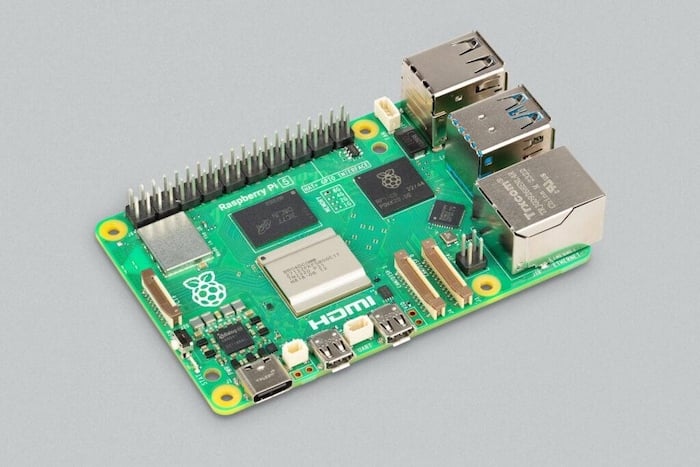
The current Raspberry Pi lineup
Raspberry Pi 5 is the flagship. Quad-core Cortex-A76 at 2.4GHz, PCIe for NVMe SSDs, two 4-lane camera/display ports, and enough headroom for light AI inference or a desktop replacement. It wants a 5V/5A supply if you’re loading up peripherals.
Raspberry Pi 4 is still the workhorse for most builds. 3A power, plenty of CPU for sensor logging, dashboards, and home automation. Cheaper and lower-draw than the Pi 5.
Raspberry Pi Zero 2 W is the tiny one: a quad-core SiP, WiFi, and Bluetooth on a board that fits inside almost anything. Good for wearables, cameras, and space-tight IoT nodes.
If your project is pure microcontroller work (read a sensor, drive a pin, no operating system), the Raspberry Pi Pico with the RP2040 chip is the cheaper, lower-power pick. Different tool, same family.
Why the Pi ended up everywhere in IoT
Two reasons. It’s cheap, and it runs full Linux. A microcontroller is cheaper still, but you write the network stack yourself. On a Pi, MQTT, REST, and WebSockets already work, so one board handles sensing, processing, and cloud upload without a second chip.
The GPIO pins talk directly to hardware, and Python plus the huge library ecosystem means you rarely start from scratch. Home automation, farm monitoring, factory-floor data logging, a robot with a camera: same board, different code.
Getting a Pi running
Flash Raspberry Pi OS onto a microSD card with the official Raspberry Pi Imager, drop the card in, and power up. Imager can preset WiFi and SSH before first boot, so a headless setup needs no keyboard or monitor at all.
For the IoT side, MQTT (via Mosquitto) is the usual message broker. Node-RED gives you a drag-and-drop flow editor if you’d rather wire logic than write it. Both install in a couple of commands.
What people actually build
| Home automation | Lights, thermostats, door sensors, and voice control, usually through Home Assistant running on the Pi. GPIO plus WiFi covers most of it. |
| Industrial monitoring | Reading machine sensors, logging data for predictive maintenance, watching a process. Small, cheap, and it doesn’t mind a dusty shelf. |
| Environmental sensing | Air quality, soil moisture, weather. The Pi reads the sensors and ships the numbers to a dashboard or database. |
What to watch out for
Power first. An undersized supply is the number one cause of random crashes and SD-card corruption. Pi 4 needs 3A, Pi 5 wants 5A with peripherals. After that: the Pi isn’t a low-power microcontroller, so battery projects need real planning, and anything facing the internet needs the usual security basics (change the default password, keep it updated, don’t expose SSH to the world).
Where it’s heading
Edge AI is the big shift. The Pi 5 has enough compute to run small vision and audio models on-device, and add-ons like the Raspberry Pi AI Kit (a Hailo accelerator on the PCIe port) push that further. More projects are doing the inference locally instead of shipping every frame to the cloud.
The community is half the value
Whatever you’re stuck on, someone has posted the fix. Forums, blogs, and GitHub repos cover almost every sensor and use case, which is a big part of why the Pi stays beginner-friendly even as the projects get advanced.
Still a great board to learn on
It was built for teaching and it’s still one of the best ways in. You get real Linux, real coding, and real hardware on one cheap board, and the hands-on side (wire a sensor, watch the number change) sticks better than any slideshow. That’s why it shows up in so many classrooms and capstone projects.
Picking a board for a build? Start with a Pi 4 for most things, step up to the Pi 5 if you need the compute or NVMe, and drop to a Zero 2 W or Pico when size and power matter more than horsepower.
Quick FAQ
What is the latest Raspberry Pi?
The Raspberry Pi 5, launched in late 2023. It runs a quad-core Cortex-A76 at 2.4GHz and adds PCIe for NVMe storage. The Pi Zero 2 W (2021) is the current tiny model, and the Pi Pico is the microcontroller board in the family.
What’s on a Raspberry Pi board?
A processor, RAM, USB and HDMI ports, onboard WiFi and Bluetooth (on the full-size and Zero W boards), and a row of GPIO pins. It runs Linux and codes in Python out of the box.
What makes it good for hardware projects?
The GPIO pins. They let a full Linux computer read sensors and drive components directly, so one cheap board covers physical computing and IoT without extra hardware.
Frequently Asked Questions
What are people doing with Raspberry Pi in 2024?
AI inference at the edge, smart-home automation hubs (often via Home Assistant), retro gaming and media servers, robotics platforms with cameras and sensors, classroom programming projects, and IoT data loggers feeding cloud dashboards.
Is the Pi 5 worth it over the Pi 4?
If you need more CPU, faster I/O, or NVMe storage support, yes. For lightweight Python projects, sensor logging, or simple web dashboards, a Pi 4 or even Pi Zero 2 W is plenty.
Why is the Pi popular for IoT?
Full Linux + Python lets you write whatever protocol you need, GPIO pins talk directly to sensors, and the network stack handles MQTT, REST, and WebSocket out of the box. One board does sensing, processing, and cloud upload.
Is Raspberry Pi a good capstone choice?
Yes for projects that need vision, databases, dashboards, or multi-service architectures. Plan power supply carefully. The Pi 4 needs 3A and the Pi 5 wants 5A for full peripherals.
{“@context”: “https://schema.org”, “@type”: “FAQPage”, “mainEntity”: [{“@type”: “Question”, “name”: “What are people doing with Raspberry Pi in 2024?”, “acceptedAnswer”: {“@type”: “Answer”, “text”: “AI inference at the edge, smart-home automation hubs (often via Home Assistant), retro gaming and media servers, robotics platforms with cameras and sensors, classroom programming projects, and IoT data loggers feeding cloud dashboards.”}}, {“@type”: “Question”, “name”: “Is the Pi 5 worth it over the Pi 4?”, “acceptedAnswer”: {“@type”: “Answer”, “text”: “If you need more CPU, faster I/O, or NVMe storage support, yes. For lightweight Python projects, sensor logging, or simple web dashboards, a Pi 4 or even Pi Zero 2 W is plenty.”}}, {“@type”: “Question”, “name”: “Why is the Pi popular for IoT?”, “acceptedAnswer”: {“@type”: “Answer”, “text”: “Full Linux + Python lets you write whatever protocol you need, GPIO pins talk directly to sensors, and the network stack handles MQTT, REST, and WebSocket out of the box. One board does sensing, processing, and cloud upload.”}}, {“@type”: “Question”, “name”: “Is Raspberry Pi a good capstone choice?”, “acceptedAnswer”: {“@type”: “Answer”, “text”: “Yes for projects that need vision, databases, dashboards, or multi-service architectures. Plan power supply carefully. The Pi 4 needs 3A and the Pi 5 wants 5A for full peripherals.”}}]}
