
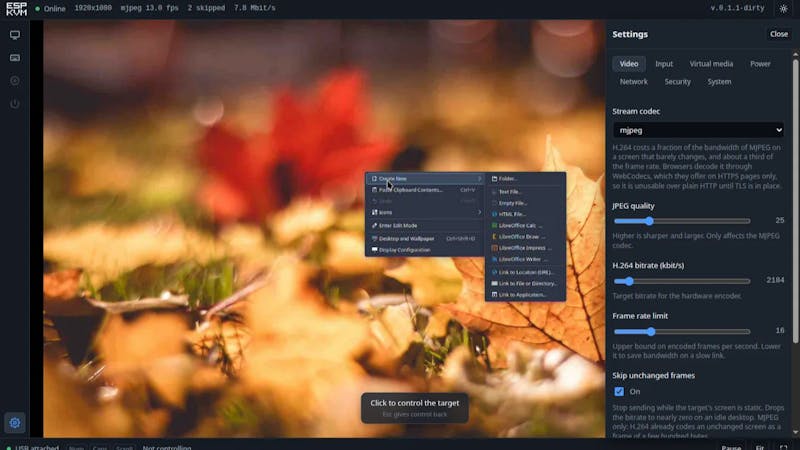
A locked-up PC with a black screen usually means walking over to wherever the machine lives, monitor and keyboard in hand. ESP-KVM deletes that walk. It runs on Espressif’s ESP32-P4 and hands you full keyboard, mouse, and live screen control of any computer from a browser tab, even when the target has no operating system booted.
The build captures the target machine’s HDMI output through a TC358743 HDMI-to-CSI bridge chip, then presents itself to that computer as a plain USB keyboard and mouse. Because the machine thinks it is talking to ordinary peripherals, ESP-KVM keeps working during BIOS screens, on a fresh install, or when the existing OS has gone sideways. The management interface is served over HTTPS, and the whole firmware fits in roughly 1 MB of flash.
What the firmware can do
Video streams as either MJPEG for higher frame rates or H.264 hardware encoding for lower bandwidth, and the display auto-follows resolution changes so you are not stuck resizing by hand. An absolute USB pointer kills the cursor drift you get with relative mouse emulation, so clicks land exactly where you aim. You can mount a disk image from a microSD card as a bootable USB drive to launch a rescue environment or an OS installer remotely. Dual application slots let a failed firmware update roll back instead of bricking the board, and MQTT auto-discovery drops live stats like frame rate, HDMI status, and device temperature straight into Home Assistant. Wake-on-LAN, replayable keyboard macros, and optional ATX power and reset control round out the feature set.
Build it yourself
The parts list is short and off-the-shelf: a Waveshare ESP32-P4-ETH dev board, a Geekworm C790 HDMI capture board (also built around the TC358743), and an optional PC817 optocoupler module if you want power-button control. Total hardware runs about $45, landing in the same bracket as entry-level commercial IP KVMs, except this one is open source and you can read every line of it. One gotcha before you deploy: the developer has not run a formal security review, so keep ESP-KVM on a trusted LAN or behind a VPN rather than the open internet. Full wiring notes and firmware are on the project write-up.
Frequently Asked Questions
What chip lets ESP-KVM capture the target computer’s video?
A TC358743 HDMI-to-CSI bridge captures the HDMI output, which the ESP32-P4 streams to your browser as MJPEG or H.264. The board also emulates a USB keyboard and mouse, so the target sees ordinary peripherals.
How much does the hardware cost to build?
About $45 in off-the-shelf parts: a Waveshare ESP32-P4-ETH board, a Geekworm C790 HDMI capture board, and an optional PC817 optocoupler for power-button control. That is the same range as entry-level commercial IP KVMs, but fully open source.
What will I learn if I build this?
You will get hands-on with the ESP32-P4, HDMI-to-CSI video capture, USB HID emulation, and streaming video over HTTPS. Wiring in the MQTT and Home Assistant integration also teaches practical IoT messaging, all useful skills for embedded and thesis projects.
