
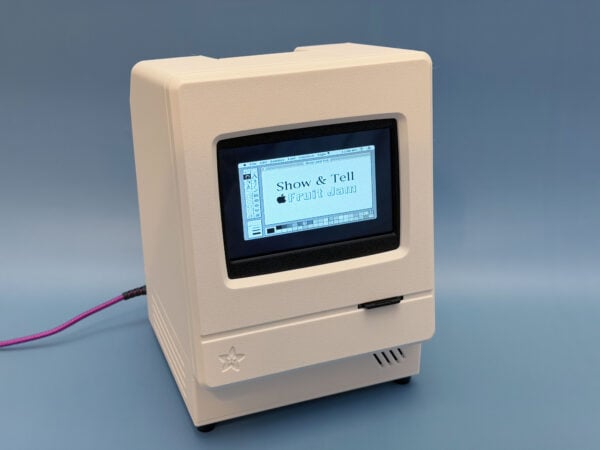
Understanding how a computer actually boots, paints pixels, and reads a keyboard gets hard when a modern OS hides every layer. A little kit that plugs straight into a screen and drops you at a blinking cursor puts those layers back in plain sight, which is why the Adafruit Fruit Jam Mini-Computer Kit works so well on a classroom or thesis bench.
The Fruit Jam (Adafruit product 6200) is a single-board computer that fits in your palm, and the Mini-Computer Kit bundles it with a case and the parts you need to drive a keyboard and a screen. What makes it fun for students is how many machines it can pretend to be. Flash one firmware and you get a Mac Classic; flash another and it becomes an Apple IIe, a CP/M box, or a Nintendo Entertainment System running the Retro Jam multi-emulator. Each build is a self-contained lesson in how those old systems handled memory, video, and input.
What is running under the hood
Fruit Jam is built on the RP2350, the dual-core chip that succeeds the RP2040 you may know from the Pico. It clocks up to 150 MHz and pushes digital video out over an HDMI/DVI connector, so the picture goes straight to any monitor with no add-on shield. A USB host port handles the keyboard, and onboard audio replays the 8-bit chiptunes the emulators expect. If you want to see how far a smaller part can stretch, the RunCPM guide runs a full CP/M machine on the older RP2040 with a USB keyboard and an HDMI screen.
Build it yourself
Start at the Adafruit Learning System kit guide, load a first emulator, then swap firmware to try the others. A weekend path that teaches a lot:
- Assemble the kit and boot the main guide image to confirm video and keyboard.
- Try a computer emulator, then a game console emulator, and compare how each maps its controls.
- Read the source firmware to see how the RP2350 juggles video output and USB input at the same time.
Full guides, wiring, and firmware links live on the project page: https://learn.adafruit.com/adabox022 . Pair it with a spare monitor and a USB keyboard and you have a retro desktop by Sunday night.
Frequently Asked Questions
Which chip powers the Fruit Jam?
It runs on the RP2350, the dual-core successor to the RP2040, clocked up to 150 MHz with HDMI/DVI video output and a USB host port for a keyboard.
What retro systems can it emulate?
With different firmware it becomes a Mac Classic, an Apple IIe, a CP/M machine, or a Nintendo Entertainment System via the Retro Jam multi-emulator, all from the same board.
What will I learn if I build this?
You will see how a computer handles video, memory, and keyboard input at a low level, practice flashing firmware, and read real emulator source that manages HDMI output and USB host at once, foundational skills for embedded and computer-architecture work.
