
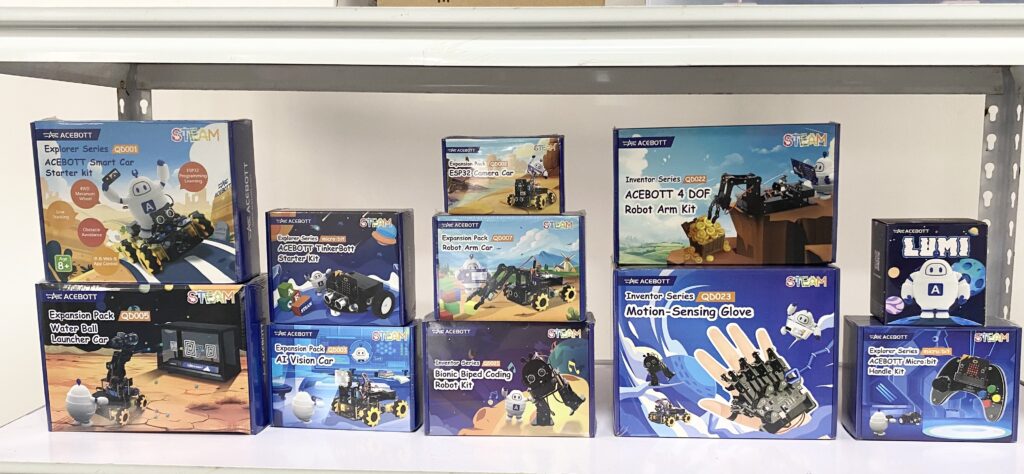
Acebott Review: The Classroom-Ready STEM Kit for PH Schools 🎒⚡
Kumusta, makers! We’re excited to officially welcome Acebott to our shelves at Circuitrocks. If you’ve been looking for a hands-on STEM kit designed specifically for students and classrooms—fast to set up, easy to follow, and genuinely fun to build—this is it.
TL;DR: If you want a classroom-ready kit with clear activities and parts that “just work” (no messy jumper wires!), this is the solution. Below, we break down what’s inside, who it’s for, and our stress-test results.
Why we stocked it
We know the struggle of Philippine educators: limited prep time and fragile components. Acebott solves three big problems:
- Kid-friendly design: Big labels, durable chassis parts, and “plug-and-play” connectors (Grove-style) mean no more confusing breadboard wiring errors.
- Teacher time-saver: Comes with structured tutorials. The lesson plans are repeatable, meaning less time debugging and more time teaching logic.
- Budget smart: Unlike proprietary closed systems, these kits work with standard Micro:bit and ESP32 boards, which you probably already have or can easily source from us.
Vibe check: We did our usual “overnight-on” torture test and the “drop-test-lite” (gentle shakes in a padded bin) to simulate a rowdy classroom bag. Result: Passed. ✅
Who it’s for
- Grades: Grades 4–6 (TinkerBott/Micro:bit versions) to Grades 7–12 (ESP32/Spider/Arm kits).
- Use cases: Robotics clubs, DepEd STEM labs, Science Fairs, and Saturday coding bootcamps.
- Skill level: True Beginner to Intermediate. No soldering is required; it focuses on logic and assembly.
What’s inside the box?
The magic of Acebott is the modularity. Here is the typical loadout for the TinkerBott and Car Kits:
- The Brain: A dedicated Expansion Board (Breakout Shield) that makes connecting sensors to your Micro:bit or ESP32 effortless.
- Sensors (The “Eyes & Ears”): Includes an Ultrasonic Sensor (for obstacle avoidance), Line Tracking Modules, and LEDs.
- Actuators: DC Motors with pre-attached wires and sturdy wheels.
- Tools: A screwdriver, USB cable, and a layout map/track.
Above: How the included ultrasonic sensor uses sound waves to “see” walls, a key concept students learn in Activity #1.
First look: The 10-minute setup
- Unbox: Scan the QR code on the lid for the digital manual.
- Assemble: Snap the wheels onto the motors and screw the chassis plates together. (The fit is tight, no rattling).
- Power Up: Insert your Micro:bit or ESP32 into the expansion slot and connect the battery pack.
- Run Activity #1: The “Avoid-The-Wall” Bot. Upload the sample code, and watch the kids’ eyes light up as it autonomously backs away from obstacles.
Pro Tip: Prepare 2–3 extra 18650 Li-ion batteries per kit if you are running a full-day workshop. They last longer than AAs and are rechargeable.
Classroom notes (from our bench test)
- Group size: 2–3 students per kit is the sweet spot (1 coder, 1 builder, 1 troubleshooter).
- Lesson time: 40–60 minutes per activity (Introduction → Build → Code → Reflect).
- Assessment idea: Don’t just grade on “does it work?” Grade on iteration—ask students, “How did you change the code to make it turn faster?”
Bundles & Add-ons (PH Pricing Friendly)
We’ve curated the best Acebott kits for the Philippine curriculum:
- Motion-Sensing Glove: Great for teaching wearables and gesture control.
- Micro:bit Gamepad Handle: Turn your robot into a remote-controlled car (requires two Micro:bits).
- TinkerBott Car (Micro:bit): The perfect entry-level robot for elementary/middle school.
- ESP32 4-DOF Robot Arm: Best for High School STEM—teaches kinematics and industrial automation concepts.
School Orders: We can issue Official Receipts (OR) and provide formal quotations for PTA or DepEd funding. Message us for a quick turnaround.
Key specs (Quick Glance)
| Core Controller | Micro:bit V2 or ESP32 (Check kit variant) |
| Coding Languages | MakeCode (Blocks), Python, C++ (Arduino IDE) |
| Power Source | 18650 Li-ion Battery or AA Holder (Included in most kits) |
| Included Lessons | 10+ Guided Tutorials (PDF/Online) |
| Build Time | 10–20 mins (Snap-and-screw assembly) |
| Local Support | Yes — Stocked & Supported by Circuitrocks |
FAQ
Is it beginner-friendly?
Yes. The activities are step-by-step with clear photos. If a student can build a Lego set, they can build the mechanical parts of Acebott.
What if I don’t know how to code?
No problem! The kits support Graphical Block Coding (MakeCode). You just drag and drop blocks like “Move Forward” or “Turn Left.” It’s perfect for teachers who are non-CS majors.
Warranty & Support?
All units are QC-checked here in Manila before shipping. If a servo or sensor arrives faulty, message us immediately for a replacement.
Ready to start building?
Grab the Acebott Kits here or ask us for a school quotation. We can also help pick the right add-ons (like extra batteries or sensors) for your specific lesson plan.
Frequently Asked Questions
What is ACEBOTT?
A classroom-ready STEM kit now available at Circuitrocks. Designed specifically for students and classrooms with kid-friendly parts, structured tutorials, and durable chassis components.
Who is ACEBOTT for?
Grades 4–6 for the TinkerBott and Micro:bit versions, Grades 7–12 for the ESP32, Spider, and Arm kits. Good for robotics clubs, DepEd STEM labs, science fairs, and Saturday coding bootcamps.
What’s inside an ACEBOTT car kit?
An expansion board (breakout shield) for Micro:bit or ESP32, an ultrasonic sensor for obstacle avoidance, line-tracking modules, LEDs, DC motors with pre-attached wires, sturdy wheels, screwdriver, USB cable, and a layout map.
How long does a kit take to set up?
About 10 minutes. Scan the QR code on the lid for the digital manual, snap wheels onto motors, screw the chassis together, insert the Micro:bit or ESP32, connect the battery pack, then upload the Avoid-The-Wall sample sketch.
