
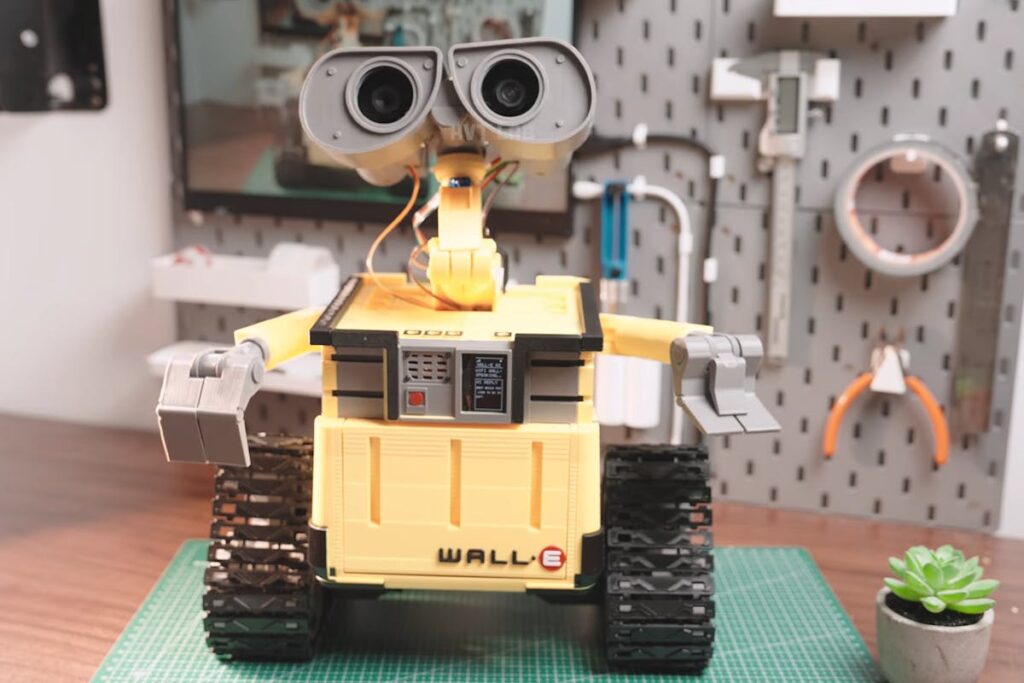
What does it take to make a desk robot that answers back? Maker Huy Vector’s answer is an ESP32-S3, seven servos, and a pair of tank tracks.
A WALL-E that isn’t just a shell
Plenty of WALL-E replicas look right and do nothing. This one drives itself across a tabletop, holds a spoken conversation, and names objects it sees through a camera tucked into one eye socket. The other eye holds the microphone. A small speaker and amplifier in the body give it a voice, and a 1.3-inch OLED, pried out of its housing and trimmed down to fit, handles the expressive animations and status readout. Seven servos drive the head, neck, arms and the rest of the articulated joints, so it can tilt, look around and gesture while it talks.
How the hardware answers
The ESP32-S3 runs the show: Wi-Fi, the firmware, and the servo choreography. Two 12 V DC motors turn the continuous tracks. Power comes from a custom three-cell lithium pack feeding those motors directly, with a buck converter dropping the rail to 5 V for the ESP32-S3 and the servo controller, plus a dedicated battery management board for charging and protection. Three details worth stealing outright: bent paper clips as mechanical linkages for the eye mechanism, neodymium magnets instead of visible screws on the body panels, and metal-geared servos swapped in after the original plastic-geared ones started slipping under load.
Firmware goes on through a browser-based Web Serial installer, so there is no toolchain to set up first. From there you join the robot to Wi-Fi and wire up speech recognition, a language model and a vision service from a web dashboard. It answers spoken questions in several languages. There is a manual mode too: the board spins up its own access point, and a phone connects straight to it to drive the tracks and trim servo positions after assembly.
Try it
Start smaller than the full replica. Get an ESP32-S3 sweeping one SG90 on a spare GPIO, confirm the servo runs off the 5 V buck rail and not the board’s onboard regulator, then hang the OLED on SDA/SCL and check your I2C address is 0x3C and not 0x3D. The gotcha that bites most first builds is the one Vector hit at the joints: servos under load will brown out the microcontroller the moment they share a rail with it. Budget a separate supply before you solder anything permanent. Full build notes, wiring shots and the video are on Hackster.
Frequently Asked Questions
What controls the WALL-E robot’s movement and AI features?
An ESP32-S3 board handles everything: Wi-Fi, the firmware, and the servo choreography for seven joints across the head, neck and arms. Two 12 V DC motors drive the continuous tracks. Speech recognition, the language model and computer vision run as cloud services that the ESP32-S3 calls over Wi-Fi, which is why a small microcontroller can manage conversation and object recognition at all.
How is the robot powered without browning out the microcontroller?
A custom three-cell lithium pack feeds the 12 V drive motors directly, while a buck converter steps the same pack down to 5 V for the ESP32-S3 and the servo controller. A separate battery management board handles charging and protection. Splitting the rails matters: servos under load pull enough current to reset a microcontroller sharing their supply.
What will I learn if I build this?
You get hands-on practice with servo control and PWM, I2C for the OLED display, power budgeting across separate motor and logic rails, and flashing an ESP32-S3 over Web Serial. On the software side you connect a microcontroller to speech and vision APIs over Wi-Fi and set up a captive access point for manual control. That mix of embedded firmware, power design and API integration maps directly onto ECE thesis and school robotics competition work.
