
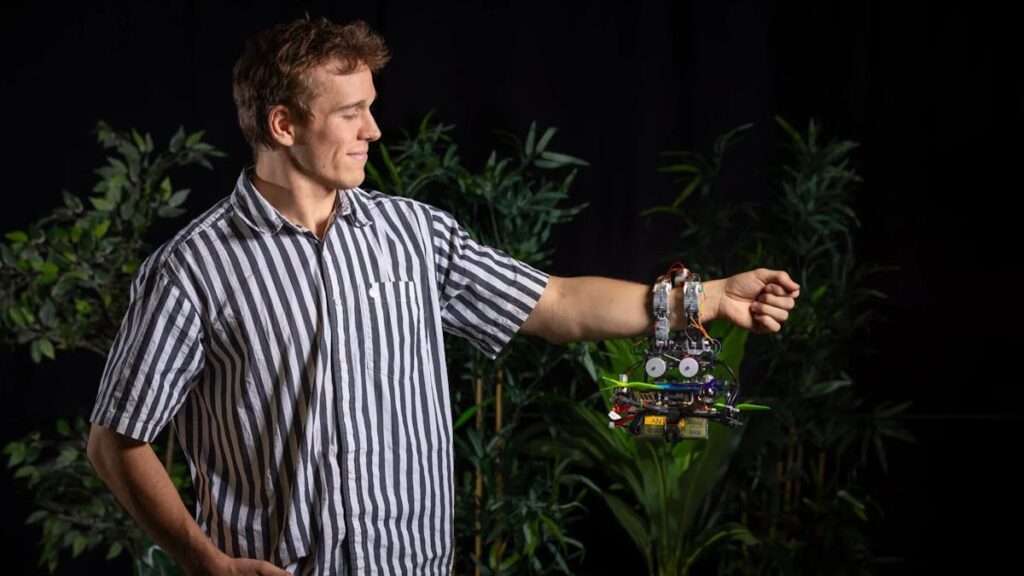
The hardest ten seconds of a drone flight are the last ten. A quadcopter drops toward a tree branch, the gripper swings down to close, and that gripper now sits directly in front of the downward camera the flight controller was counting on. The aircraft goes blind at the exact moment it needs to see, and the battery keeps draining while it hovers and retries.
A team at TU Delft decided the camera was simply the wrong sensor for that moment. Their drone lands the way a bird does: by feel.
A hand with nine yes-or-no sensors
The aircraft carries a three-fingered hand, each finger split into three segments, with nine tactile sensors buried under soft silicone pads. Those sensors are deliberately dumb. Each one reports a single bit, touching or not touching, with no pressure curve, no calibration table, and no analog front end to trim. Because the flight computer already knows the angle of every finger segment, nine binary contacts plus known joint geometry are enough to solve for where the branch sits and which way it runs.
Search, touch, correct, grip
The drone flies a figure-eight pattern over its best guess of the perch, opening and closing the hand as it goes. First contact gives a rough fix. It then shifts position, rotates to line up with the branch axis, and keeps closing until all three fingers report stable contact. Motors cut only after the grip is confirmed. A bad grasp means backing off to a hover and starting the sequence again.
The mechanical side is just as frugal. Torsional springs pull each finger closed, so holding on draws zero current once the drone has landed, which is the entire point of perching. A single tendon per finger pulls it back open when it is time to leave.
In Monte Carlo simulation the tactile approach cleared a 99 percent perch rate, and it held up with the starting position estimate off by 0.6 meters or the orientation wrong by 50 degrees, errors that break vision-guided landings outright. Across 26 real autonomous flights with deliberately corrupted position data, the same hand gripped branches of varying diameter, wooden beams, traffic cones, and a volunteer’s arm, with no per-surface hardware changes.
What to steal for your own build
The transferable idea costs almost nothing: contact detection beats precision sensing when you already have geometry to fill in the gaps. You can prove the concept on a bench with a servo-driven gripper and three microswitches wired to GPIO with the internal pull-ups enabled, no load cells and no ADC channels burned. Watch for switch bounce on first contact, since a 20 ms debounce in software will save you chasing phantom grips. Read the full write-up at Hackster before you cut any brackets.
Frequently Asked Questions
How does the drone find the branch without using a camera?
It flies a figure-eight search pattern over a rough guess of the perch location while repeatedly opening and closing its hand. The first physical contact gives an initial fix, then the drone shifts and rotates to align with the branch axis until all three fingers report stable contact. Motors only shut off once the grip is confirmed.
What sensors does the robotic hand actually use?
Nine tactile sensors sit under soft silicone pads, spread across three fingers of three segments each. They are binary sensors, reporting only touching or not touching rather than a pressure value. Combined with the known angle of each finger segment, that is enough geometry to work out where the branch is and how it is oriented.
What will I learn if I build this?
You will pick up contact-based state estimation, which is a core robotics skill: using cheap binary inputs plus known link geometry instead of expensive precision sensors. A bench version teaches servo gripper control, GPIO input handling with internal pull-ups, switch debouncing, and closed-loop retry logic when a grasp fails. Those transfer directly to thesis-level robotic manipulation and autonomous landing work.
