
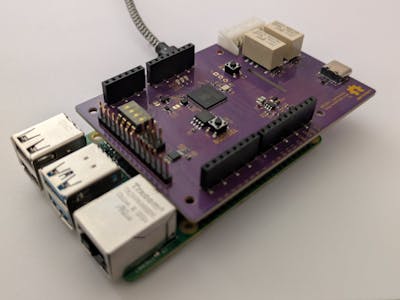
Picking between a microcontroller and a single-board computer is one of the first forks in any embedded project, and it matters more than it looks. A Raspberry Pi gives you a full multitasking operating system, but Linux is not built for deterministic, microsecond-accurate timing. The moment your project needs both a real desktop-class OS and hard real-time control, you are stuck juggling two boards and a fragile link between them. That gap is exactly what the RPI RTShield closes.
Built by maker Machinehum, the RTShield is a Raspberry Pi HAT that bolts an RP2350 microcontroller directly onto your Pi, acting as a dedicated real-time companion. It is conceptually similar to the Arduino UNO Q for the Pi ecosystem: the Pi runs your high-level software while the RP2350 handles the time-critical work. The two talk over a UART serial link, and crucially, all sensors and external hardware wire into the microcontroller rather than the Pi. That routing is the whole point, since it keeps deterministic monitoring and control off the multitasking OS where timing guarantees fall apart.
What the hardware gives you
The RP2350 anchors a genuinely useful I/O set: eight 12-bit analog inputs spanning 0 to 3.3 volts, four 12-bit analog outputs, two relays for dry-contact switching, three status LEDs, configuration DIP switches, and Arduino-compatible headers for expansion. That mix suits robotics, industrial monitoring, and automation where you need Linux software alongside microcontroller-grade hardware control. Better still, the RP2350 is programmed straight from the Pi over OpenOCD and GPIO-connected SWD, so no external programmer is required. A companion Python module lets you read analog inputs, drive outputs, flip relays, and check switches in just a few lines, all from Linux. The project is open source under CC BY-NC-SA 4.0, with full details in the RTShield GitHub repo.
Build it yourself
Want to experiment with the same split-brain approach? Start with a Raspberry Pi and an RP2040/RP2350-class board from Circuit.Rocks, wire them over UART, and route your sensors through the microcontroller side. It is a clean, reproducible way to give a Pi project real-time muscle without leaving the Python comfort zone.
Frequently Asked Questions
How does the RTShield give a Raspberry Pi real-time control?
It adds an RP2350 microcontroller on a HAT that talks to the Pi over UART. Sensors connect to the RP2350, so time-critical monitoring and control run deterministically on the microcontroller while Linux handles everything else.
Do I need a separate programmer to flash the RP2350?
No. The RP2350 is programmed directly from the Raspberry Pi using OpenOCD over GPIO-connected SWD signals, so no external programming adapter is needed.
What will I learn by building a project like this?
You’ll learn how to pair a single-board computer with a microcontroller over a UART link, why real-time tasks belong on a dedicated MCU, and how to drive analog I/O, relays, and digital pins from Python on Linux.
