
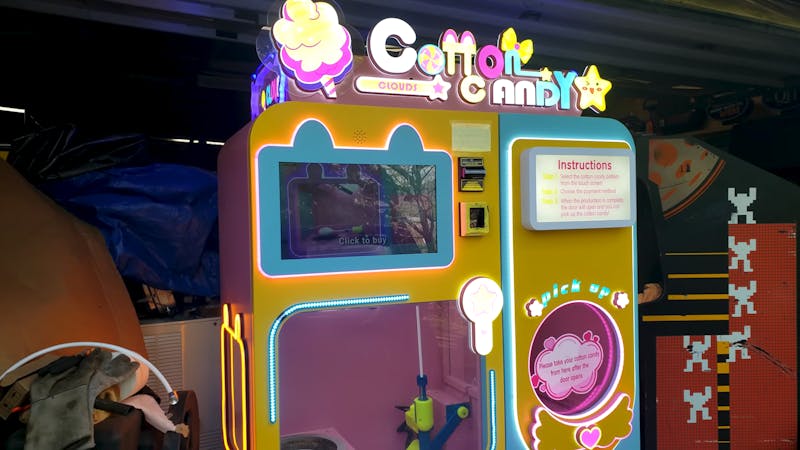
Buy the hardware, own the hardware. That idea gets tested fast when a $6,400 machine refuses to run unless it can phone a server you don’t control. The maker behind Block’s Retro Repairs bought a commercial automated cotton candy vending machine, found it fenced in by manufacturer software, and spent weeks pulling apart both the electronics and the app until the thing ran offline. For anyone studying embedded systems, that teardown teaches more than most lab manuals.
What’s actually inside a cotton candy robot
Behind the touchscreen sits an embedded Android computer coordinating everything. A multi-axis robotic arm picks a paper stick, holds it over the spinning sugar head, and walks it through a programmed motion path while a heated shaping knife carves the floss into layered geometric cones. Solenoid-controlled hoppers meter out different sugar flavors. A bill validator and a cellular card reader take payment. It is a small factory cell in a box, and every subsystem is something a robotics club would recognize: actuators, sensors, and one controller stitching them together.
ADB, SQLite, and a stubborn APK
The way in was a hidden network ADB interface, Android Debug Bridge over TCP, which normally listens on port 5555 once it is switched on. From there he pulled the machine’s application and opened its SQLite database, which held the internal recipe names plus sales history: roughly $6,700 in lifetime revenue against that $6,400 purchase price. Editing rows directly failed, because the app checked its data against a remote server and fell into a boot loop. So the work moved up a layer. Decompiling and patching the APK added a hidden administrator menu, unlocked custom pricing, and emulated a successful online status so the machine stops caring whether the internet exists.
Build it yourself
You do not need a vending machine to practice any of this. Point adb connect <ip>:5555 at an old Android tablet, pull an app you wrote yourself, and read its database with the sqlite3 CLI. Then work the other direction: drive a 12V solenoid valve from an Arduino or ESP32 through a MOSFET, with a flyback diode across the coil. Skip that diode and the inductive kick will take out your transistor on the first release. Add a limit switch on a GPIO pin with a pull-up resistor and you have the same sense-then-actuate loop the candy machine runs hundreds of times a day.
One more lesson from the build: the final fault was not software at all. A disconnected solenoid wiring harness meant sugar never reached the spinning head. Check your connectors before you blame your code. Full teardown and video at Hackster.io.
Frequently Asked Questions
How did the maker get access to the vending machine’s software?
Through a hidden network ADB (Android Debug Bridge) interface on the embedded Android computer. Once enabled, ADB over TCP listens on port 5555, which allowed the app and its SQLite database to be pulled off the machine.
Why wasn’t editing the database enough to unlock the machine?
The application validated its own data against the manufacturer’s remote server, so hand-edited rows triggered a boot loop. The fix had to happen a layer up: decompiling and patching the APK to add an admin menu, allow custom pricing, and emulate a successful online check.
What will I learn if I build something like this?
Three skills that transfer straight to thesis and capstone work: reading an unfamiliar embedded system through its debug interface, inspecting an SQLite schema to understand how a device stores state, and driving inductive loads like solenoids safely with a MOSFET and flyback diode. The wiring-harness fault at the end is also a reminder to debug hardware before rewriting firmware.
