
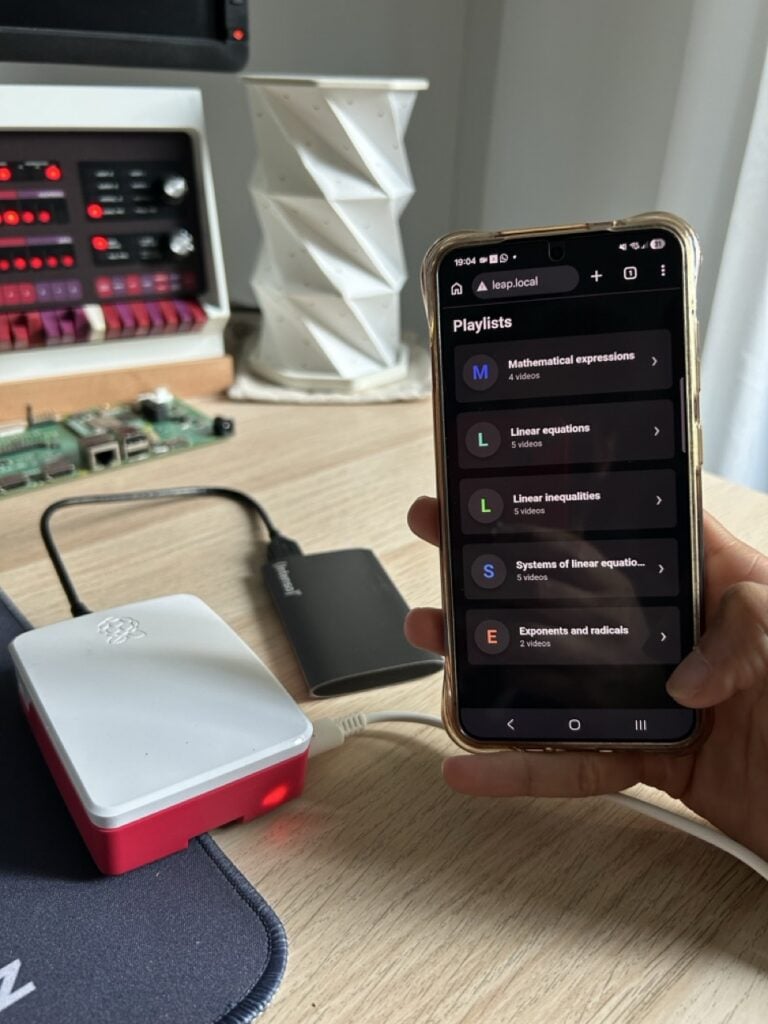
How do you stream video lessons to 40 students in a classroom that has no internet at all?
That was the question in front of T4EQ when they started working with AID India, a nonprofit running education centres in rural Tamil Nadu. Their answer is LEAP, the Low-bandwidth Educational Access Platform. It is one Raspberry Pi 4 sitting in the corner of the room, caching curriculum video and serving it over a local router to whatever cheap tablets and phones the kids have in front of them. No cell tower, no fibre, no monthly data plan. Once the content lands on the node, the connection can drop dead and the lesson keeps playing.
What is actually in the box?
Almost nothing, and that is the point.
- Raspberry Pi 4, the 1GB variant, picked for price and availability rather than horsepower
- USB storage holding the cached video library
- An ordinary router with no WAN uplink attached
The Pi 4‘s gigabit Ethernet port and USB 3.0 bus are the two specs doing the heavy lifting. Forty browsers pulling video off a microSD card would choke it; hanging the library on USB 3.0 and pushing frames out over a wired gigabit link is what keeps 40 concurrent clients watchable. Everything the students touch runs in a browser, so a “thin client” can be a five-year-old Android phone with a cracked screen.
How does content get in without internet?
Two paths. Where a trickle of bandwidth exists, the node polls an Amazon S3 bucket for a manifest file listing the sections and videos it should hold, then downloads only what changed. Interrupted downloads resume instead of restarting, and a synced database on each node tracks what is already local, which is the kind of detail that separates a demo from something that survives a village brownout. Where there is no data at all, a teacher walks in with a USB drive, plugs it into the node, and the same manifest logic imports the content. Different centres track different manifests, so a node serving ten-year-olds never has to carry the secondary-school library.
Try it on your own campus
The LEAP code is open source on GitHub, and the two-hour version of it is well inside the reach of any ECE or CS student with a spare board. Flash Raspberry Pi OS Lite, mount a USB stick, point nginx at a folder of MP4s on port 80, and see how many phones in your section can pull 720p at once before the router taps out. That single test tells you more about serving media on constrained hardware than a semester of lecture slides. A Pi 4 and a gigabit switch are both on the shelf at circuit.rocks when you are ready to build the real node. Full project write-up: raspberrypi.com.
Frequently Asked Questions
What hardware does a LEAP Node run on?
A Raspberry Pi 4 with 1GB of RAM, USB storage for the cached video library, and an ordinary router. The team chose the Pi 4 for its low cost, gigabit Ethernet port, and USB 3.0 bus, which together let one node feed roughly 40 client devices at once.
Do students need the internet or a special app to use it?
Neither. The LEAP Node serves everything through a browser-based interface on the local network, so any phone or tablet that can open a web page works as a thin client. Content reaches the node either by polling an Amazon S3 manifest when a little bandwidth exists, or by a teacher plugging in a USB drive when there is none.
What will I learn if I build this?
You will pick up practical local web serving on Linux, how to mount and serve media from external USB storage, why gigabit Ethernet and USB 3.0 throughput matter once dozens of clients hit the same box, and how manifest-driven sync with resumable downloads works. Those are transferable skills for any thesis project involving offline-first systems or classroom hardware.
