
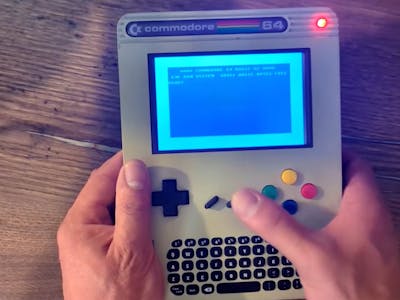
A YouTuber who goes by Retro Dad wanted to play Commodore 64 games on the couch, in the car, or anywhere else, so he packed a full C64 experience into a handheld you can pull from a bag and boot straight to that famous blinking blue cursor.
The build runs on a Raspberry Pi 3 Model B. Rather than chase rare original hardware, Retro Dad installed VICE, the well-known C64 emulator, and set the operating system to boot directly into it. A salvaged Xbox Chatpad PCB acts as the keyboard over its own wireless dongle, while a small HDMI screen and a USB battery bank make the whole thing self-contained. A speaker and amplifier module cover the chiptunes.
Bridging 40-year-old joysticks to a modern Pi
The clever part is the joystick support. Classic C64 controllers use 9-pin D-sub connectors that no modern computer recognizes. Instead of dropping authentic gamepads, Retro Dad wired in a Raspberry Pi Pico as a translator: the Pico reads the old joystick signals on its GPIO pins and hands them to the Pi 3 in a form it can parse. If you would rather travel light, an onboard D-pad and buttons salvaged from a USB controller are wired in as well.
Because everything uses off-the-shelf modules, you can assemble the handheld without touching a soldering iron. The tradeoff is bulk; it is a chunky little device. The Pi 3 is Arm-based, not the original 6502, so genuine C64 cartridges will not run, but VICE gets close enough that most players never notice.
Build one yourself
The whole project is open source. Retro Dad published the printable case files, wiring diagrams, custom firmware, and a full build guide, all linked from the original write-up on Hackster. For an ECE student hunting a term project that teaches emulation, GPIO signal handling, and power management in one go, this is a strong candidate. Grab a Raspberry Pi 3 or a Pi Pico from circuit.rocks and start by wiring a single joystick port before you tackle the full set.
Frequently Asked Questions
What emulator does this Commodore 64 handheld run?
It runs VICE, the open-source Commodore emulator, on a Raspberry Pi 3 Model B. The operating system is set to boot straight into VICE, so it lands on the classic blue C64 cursor with no menus in the way.
How does it connect classic 9-pin joysticks?
A Raspberry Pi Pico sits between the vintage 9-pin D-sub joystick ports and the Pi 3, reading the old signals on its GPIO pins and converting them into input the Pi understands. Onboard D-pad buttons salvaged from a USB controller give you a solder-free option too.
What will I learn if I build this?
You will practice setting up emulation on a Raspberry Pi, wiring GPIO on a Pi Pico to translate legacy signals, and managing HDMI output and battery power inside a compact enclosure, a tidy mix of embedded and retro-computing skills.
