
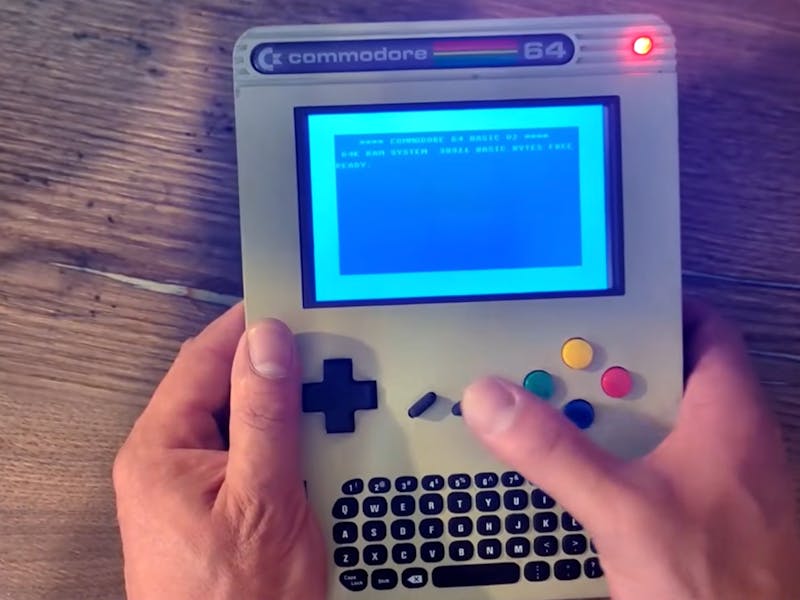
The Commodore 64 still holds the record as the best-selling single computer model ever made, and more than four decades after its 1982 debut people keep dragging it back into the present. For a student learning how early machines actually worked, a pocketable C64 is a history lesson you can hold in one hand and boot on the jeepney home.
YouTuber Retro Dad packed a full C64 experience into a handheld enclosure built around a Raspberry Pi 3 Model B. It carries a real keyboard, dedicated gaming controls, and authentic Commodore joystick ports, so you can pull it out anywhere and load a classic. The whole project is open source, with case files, custom firmware, wiring diagrams, and a full build guide posted for anyone who wants to make their own. You can read the full teardown on the Hackster build page.
How the electronics fit together
The keyboard is the clever bit. Retro Dad tore down an Xbox Chatpad, pulled the bare PCB, and dropped it into the case along with its wireless dongle so the Pi talks to it over the air. A speaker and a small amplifier module handle the chiptune audio. Those old 9-pin D-sub joystick connectors are almost extinct now, so a Raspberry Pi Pico sits in the middle as a translator, reading the joystick signals and passing them to the Pi in a form it understands. Want to travel light? An onboard D-pad and buttons salvaged from a USB controller do the job too.
Build one yourself
Because every part is off-the-shelf, you can assemble this without ever touching a soldering iron, though the trade-off is bulk, it is a chunky little device. You will want a Raspberry Pi 3 Model B, a Pi Pico, a small HDMI display, a USB battery bank, a speaker with an amp module, and a donor controller for the buttons. The Pi runs the VICE emulator and boots straight into it, dropping you at that familiar blinking blue cursor. The Arm chip inside cannot run original 6502 software, but VICE emulates it so closely you will barely notice. Grab the firmware and wiring diagrams from the repo, and start with the keyboard wiring before you close up the case.
Frequently Asked Questions
Which board runs the Commodore 64 emulation?
A Raspberry Pi 3 Model B runs the VICE emulator and boots directly into it. A separate Raspberry Pi Pico acts as a translator so the classic 9-pin D-sub joysticks can talk to the Pi.
Do I need to solder anything to build it?
No. Every part is off-the-shelf, from the Xbox Chatpad keyboard PCB to the salvaged USB controller buttons, so the build skips the soldering iron. The trade-off is size, since the finished handheld is fairly chunky.
What will I learn if I build this?
You will practice emulator setup on Linux, wiring a keyboard and audio amp, and using a microcontroller like the Pi Pico to bridge an old signal standard to a modern computer. It is a solid intro to interfacing legacy hardware with a Raspberry Pi.
