
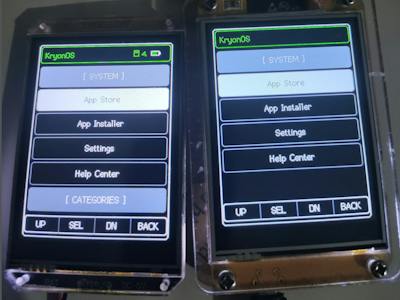
Picture the usual ESP32 routine. You write firmware, flash it over USB, and the board becomes a weather station forever. Want it to do something else? Rebuild, reflash, wait for the upload bar. After the fifth reflash in one evening, a tiny desktop that just launches apps starts to sound pretty good.
What got built
That is the itch KryonOS scratches. It is an open source graphical operating system for the ESP32 and ESP32-S3, with a desktop-style launcher, a file manager, an app store, and cloud services. Flash the OS once, then copy JavaScript apps onto the device and run them without touching the firmware again. Stable support covers ESP32 and ESP32-S3 boards, while experimental ports target the M5Stack Cardputer, LILYGO T-HMI, and Cheap Yellow Display boards.
How it works under the hood
The scripting layer is the Duktape engine, which runs ECMAScript 5.1 plus a few newer features. Each app is just a small metadata file and one JavaScript source file. Apps get roughly 90 KB of usable RAM, so forget about npm-sized dependencies and keep your code lean.
The hardware APIs cover what you would expect on a breadboard: GPIO read and write, I2C (SDA and SCL), analog input, PWM, SD card storage, and display drawing. Graphics are double-buffered to avoid flicker, and a Kryon3D engine adds wireframe and shaded 3D with lighting. The reference rig pairs an ESP32-S3 DevKitC-1 with an ILI9341 touchscreen and an SD card on its own SPI bus. A gotcha worth planning for: give the SD card a dedicated SPI bus rather than sharing it with the display, or you will chase glitchy reads.
The takeaway for your bench
For a school robotics club, this changes the workflow. One flashed board can host a sensor dashboard on Monday and a student-written game on Friday, with no toolchain install on every laptop. Thesis teams can prototype a UI in JavaScript first, then port the stable parts to C later.
Start with the project page and repo linked from the original Hackster write-up. If you have a Cheap Yellow Display lying around, try the experimental port before buying anything new.
Frequently Asked Questions
What does KryonOS run on?
How much memory do KryonOS apps get?
About 90 KB of usable RAM per app, running on the Duktape engine with ECMAScript 5.1 support. That is enough for small tools, dashboards, and games, but not for heavy libraries.
What will I learn if I build this?
You will practice GPIO, I2C, PWM, and SPI wiring, learn how an embedded runtime manages tight RAM, and write JavaScript that talks to real hardware. It also shows how an OS separates apps from firmware.
