
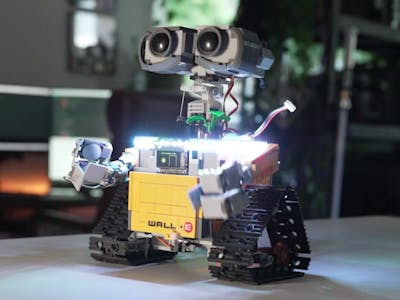
A LEGO WALL-E set on a shelf is nice, but a LEGO WALL-E that actually drives around your living room is something else entirely. Maker Crostplay2 stuffed an entire robotics platform inside Pixar’s tiny cleanup hero, and the result behaves more like the movie character than anyone would expect from a brick model.
The build started with the official LEGO WALL-E set, which is great for looks but useless for motion. Crostplay2 swapped the static interior for an ESP32 microcontroller, hobby-grade motors, and a fistful of micro servos. The ESP32 was the obvious pick here: its built-in Bluetooth pairs with a PlayStation 4 controller through the Bluepad32 library, so the analog sticks drive the tracks and the controller’s gyroscope tilts WALL-E’s head when you tilt the pad.
The hard parts hiding inside the bricks
Getting hobby motors to talk to LEGO is messy. Crostplay2 designed custom 3D-printed mounts and LEGO-compatible drive gears from scratch, then routed everything into a tank-style steering layout so WALL-E can pivot in place. The original wobbly LEGO neck joint was replaced with a stabilized twin-rod mechanism that keeps the head from flopping during drives.
Because the ESP32 ran out of GPIO pins partway through the build, a second microcontroller (an Arduino Nano) was added just to drive a tiny chest screen that plays a looping solar-charging animation. Addressable NeoPixel LEDs handle headlights, taillights, and a party mode, while a small speaker plays movie audio clips triggered from the PS4 touchpad. One painful lesson along the way: several motor driver boards were fried by back-feeding voltage during firmware uploads, which was eventually fixed with an isolation switch.
Build it yourself
If you want to attempt your own animatronic WALL-E, the core parts list is approachable:
- An ESP32 dev board for motion and Bluetooth control
- An Arduino Nano as a secondary controller for the chest display
- Micro servos for the arms, hatch, head rotation, and eyes
- Hobby DC motors with a motor driver for the tracks
- Addressable NeoPixel LEDs for lights and effects
- A small speaker and a tiny screen for the chest animation
- 3D-printed LEGO-compatible gears and motor mounts
Pair that with the Bluepad32 library and any spare PS4 controller and you’re most of the way to a robot WALL-E that listens to your every joystick command. No build guide is published yet, but the project video walks through enough of the wiring and mechanical tricks to copy the approach.
Frequently Asked Questions
What microcontroller and library control this WALL-E robot?
The build uses an ESP32 for the main motion and Bluetooth handling, paired with the Bluepad32 library so a PS4 controller can drive the tracks, head, and servos. A secondary Arduino Nano runs the small chest display because the ESP32 ran out of free GPIO pins.
What parts do I need to replicate the build?
At minimum you need a LEGO WALL-E set, an ESP32 dev board, a few micro servos, hobby DC motors with a driver, NeoPixel LEDs, a small speaker, a tiny chest display, and custom 3D-printed LEGO-compatible gears. A spare PS4 controller handles input.
