
Anyone who has coded a menu on a microcontroller knows the pain: a wall of if statements, a redraw routine you copy-paste, and a device that freezes the moment two button presses overlap. Joey Castillo’s Focus framework matters because it hands that mess a real structure, and it does so on a chip with roughly 520 KB of RAM instead of a desktop’s gigabytes.
What Focus actually is
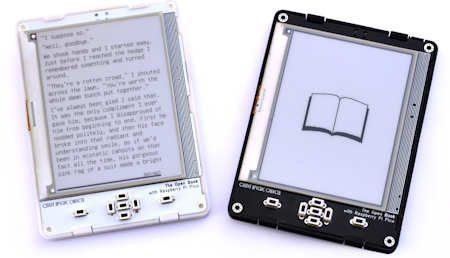
Focus is an open-source C++ user interface framework built for resource-constrained boards like the ESP32. Instead of another one-off Arduino sketch, you get an object-oriented system borrowed from classic Apple UI ideas, specifically the AppKit and roughly-2008 UIKit way of arranging things on screen. It is the software engine behind Castillo’s Open Book, a DIY open-source e-reader that drives an e-paper display over SPI. If you have ever wanted your handheld project to feel like an app rather than a demo, this is the pattern it follows.
How it works under the hood
The framework gives you a full view hierarchy: views hold subviews, and view controller objects manage each screen through lifecycle callbacks, so a menu knows when it appears and disappears. A single-threaded cooperative task scheduler lets the ESP32 juggle several app actions without the crashes that plague hand-rolled loops. On top of that sit standard controls, buttons and toggles with target-action wiring and state-keyed visuals, so a button shows distinct pressed and idle art without extra bookkeeping. Navigation stacks handle deep menus, modal overlays throw up alerts, and localizable strings mean your labels are not hard-coded to one language.
Build a version yourself
You need three things to start: an ESP32 dev board, which runs about ₱300 at circuit.rocks, a small SPI display (an e-paper panel or a color TFT both work), and a couple of push buttons wired to spare GPIO pins. Clone the framework from Castillo’s GitHub repo at github.com/joeycastillo/focus, wire the display’s SDA and SCL or SPI lines to the ESP32, and flash one of the example view controllers. From there, subclass a view controller for each screen and let the scheduler run the loop. A common gotcha: e-paper refreshes are slow, so batch your screen updates instead of redrawing on every input. For the full reference build, the Open Book project write-up lives at oddlyspecificobjects.com, and it is a solid capstone-sized target for a student embedded team.
Frequently Asked Questions
What hardware does the Focus framework run on?
It targets resource-constrained boards like the ESP32, and it powers the Open Book e-reader, which drives an e-paper display over SPI.
What do I need to build my own Focus-based device?
An ESP32 dev board (about around ₱300 at circuit.rocks), a small SPI display such as an e-paper panel or color TFT, and a few push buttons wired to spare GPIO pins.
What will I learn if I build this?
You will pick up object-oriented C++, view-hierarchy and view-controller patterns, cooperative task scheduling, and how to wire and drive an SPI display from an ESP32, all transferable embedded skills for a thesis or capstone.
