
What to pull off the shelf first
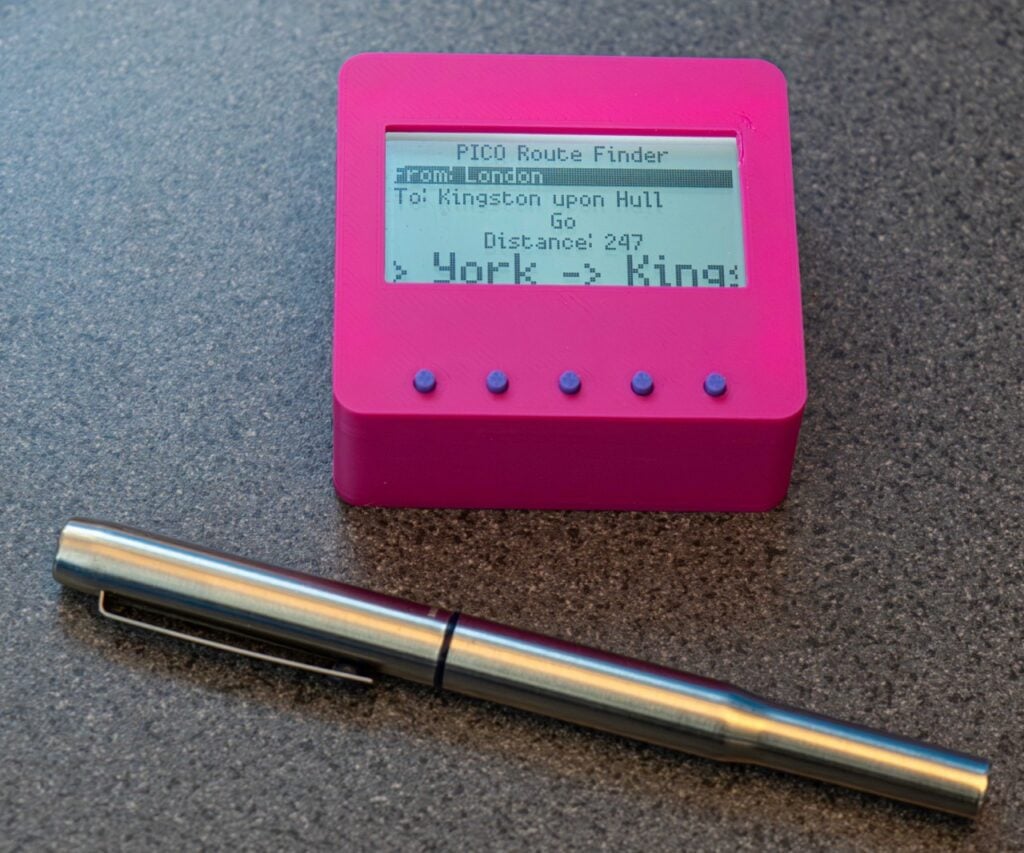
One Raspberry Pi Pico, a small SPI colour LCD, a couple of tactile buttons, and a breadboard. That is the entire bill of materials for the Pico Route Finder, a pocket gadget that stores a map of UK towns and reports the cheapest path between any two of them. Everything runs in MicroPython, so you can get the routing logic correct in a terminal on your laptop before a single wire touches a GPIO pin. Start there: write the algorithm, print the route, then bolt on the display.
Learn it as a treasure hunt
The tutorial teaches Edsger Dijkstra’s 1956 route-finding algorithm using a castle. You start in the Hall, each door is labelled with a cost, and a pile of gold sits in the Treasure Room. Walking straight there costs 100 coins. Wandering through the Library, Kitchen, Dining Hall and Bedroom instead costs 18. The algorithm boils down to three rules: track what each room costs to reach, always explore the cheapest unvisited room next, and remember where you have already been. Fill in a paper table as you go and you will arrive at the same answer the code does, which makes it a clean whiteboard exercise for a class before anyone opens an editor.
Turning the notebook into code
In Python the notebook becomes a NodeRouteData class holding a name, a cost, a visited flag, and a route-back reference, all stored in a dictionary keyed by room name. An outer while loop keeps stepping to the lowest-cost unvisited node until the destination name matches. Swap the hand-typed doors for a map_graph.json file of towns, coordinates and distances and the same loop plots real routes, which is what the Pico renders on its LCD. The RP2040 handles this comfortably: two Cortex-M0+ cores at 133 MHz, 264 KB of SRAM and 2 MB of flash leave plenty of headroom for a few hundred nodes. Dijkstra’s original demo was capped at 64 locations because he packed each location number into 6 bits.
Where to take it next
Pure Dijkstra explores outward in every direction, so a London-to-Hull query checks Truro before it finishes. That is exactly the gap A* fills by adding a distance-to-target heuristic, and swapping one for the other is a tidy follow-up for a thesis chapter or a robotics team’s path planner. Replace the UK data with your own campus, barangay or MRT map and the same 26 GPIO pins will happily drive the display plus a rotary encoder for picking start and end points. Full walkthrough and sample code: raspberrypi.com.
Frequently Asked Questions
What hardware does the Pico Route Finder actually use?
A Raspberry Pi Pico driving a small SPI colour LCD, with buttons for choosing the start and end points. The map itself lives in a JSON file on the Pico‘s 2 MB flash, so there is no network connection or GPS module involved.
Do I need the hardware to follow the tutorial?
No. The castle example runs entirely in a terminal with typed room names and door costs, so you can work through Dijkstra’s algorithm on any machine that has Python. The Pico and LCD only come in once you swap the typed input for a map_graph.json file.
What will I learn if I build this?
Graph theory you can actually see running: nodes, edge costs, visited sets and shortest-path search. On the Python side you get classes, dictionaries and object references, and on the hardware side you get MicroPython on the RP2040 plus SPI display wiring. It maps directly onto data structures coursework and onto path planning for a competition robot.
