
Picture a Pico W bolted into a school robotics cart, three rooms away from the nearest access point. The Wi-Fi drops every time the cart rolls past the gym wall, and the team loses its MQTT telemetry mid-demo. A cable would have fixed it, except the Pico has no Ethernet port.
What Olimex built
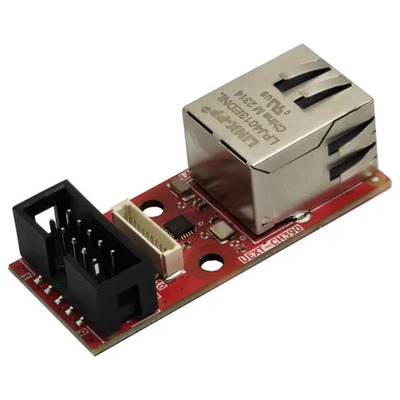
Olimex’s new UEXT-CH390 is a 50 x 21 mm module that adds 100 Mbit wired Ethernet to any board with a UEXT or pUEXT connector. It carries both the classic UEXT header and the smaller 1.0 mm pUEXT one. The chip doing the work is the WCH CH390, an SPI-to-Ethernet controller, so the host board only spends four SPI lines plus an interrupt pin on networking.
Which boards it rescues
Plenty of ESP32 parts lack a wired Ethernet MAC, including the ESP32-S3, C3, C5 and C6. The CH390 route gives them a cable connection anyway, and the same goes for the Raspberry Pi Pico and Pico 2. ESPHome previously supported the CH390 only on ESP32, so Olimex wrote the RP2040 driver themselves. Their example pins a specific version of the ESPHome Ethernet component, tested with ESPHome 2026.9.0, and a ready-to-flash UF2 shows up in Home Assistant right after boot.
A plain Pico SDK example is included too, with lwIP and a small web server. The gotcha for Arduino users: check that your library version lists the CH390 before you wire anything, because older cores only know the W5500 and ENC28J60.
Takeaway for the bench
Wired links beat Wi-Fi for anything fixed in place, like a thesis weather node or a lab door sensor. The module is 4.95 EUR on pre-order and ships from 9 November 2026. KiCad sources, the schematic and firmware are all open on GitHub, so ECE students can read the layout before ordering. Start with the source write-up, then flash the UF2 on a spare Pico and confirm it appears in Home Assistant.
Frequently Asked Questions
Which boards work with the UEXT-CH390?
Any board with a UEXT or pUEXT connector, including the Raspberry Pi Pico, Pico 2, and ESP32-S3, C3, C5 and C6 that lack a wired Ethernet MAC.
What software does it support?
What will I learn if I build this?
You will practice SPI wiring, reading a KiCad schematic, setting up ESPHome Ethernet components, and comparing wired and Wi-Fi reliability for IoT projects.
