
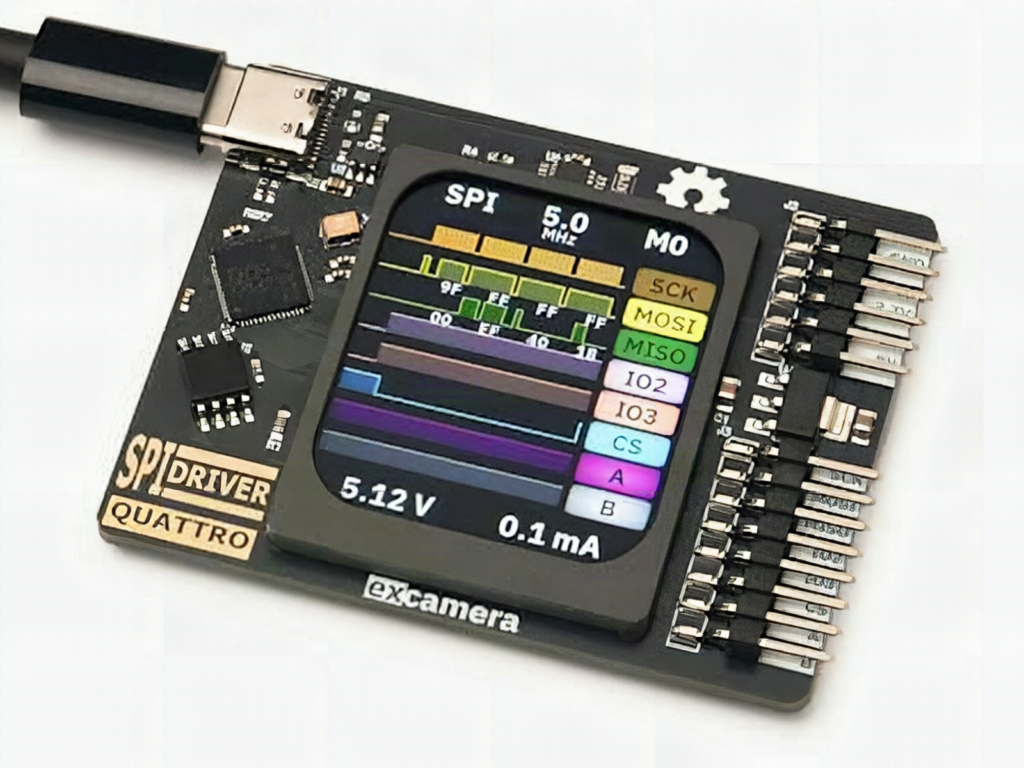
Your logic analyzer shows a clean clock, your SPI flash returns 0xFF on every read, and you have no idea whether the bug lives in your code or on the wire. James Bowman of Excamera Labs wants to end that guessing game with the SPIDriver Quattro, a USB to SPI tool with its own screen.
What the Quattro does
The device plugs into Windows, macOS, or Linux and shows up as a standard serial port, so there are no drivers to hunt down. It works in three modes. As a driver, it is a USB to SPI bridge that lets your laptop talk to a display, flash chip, or ADC. As a monitor, it sits passively on the bus and shows the traffic. In capture mode, it records transactions for later analysis. The name comes from quad-SPI support, on top of dual and standard SPI.
The technical bits worth knowing
A built-in IPS display of the full-color kind shows live traffic, so you can watch data replies appear the moment you power the target. Current sensing is good to 0.1 mA, which means a chip that suddenly draws more current after an init sequence shows up right on the screen. That is a handy gotcha detector: a misconfigured pull-up or a floating chip-select often looks like a mystery current jump long before it looks like a protocol error. Language bindings are included, so you can script test runs instead of clicking through them. Bowman plans to release the hardware and software design files under the BSD three-clause license when units ship.
Build it yourself (or at least borrow the habit)
The Quattro is headed for a Crowd Supply campaign, so there is no price yet. You can still copy the workflow on a breadboard with an Arduino or ESP32 board, a 3.3 V SPI flash such as a W25Q64 (64 Mbit), and four wires: SCK, MOSI, MISO, and CS. Read the JEDEC ID first (command 0x9F). If you get 0xEF4017, the wiring and clock mode are fine. If you get all ones, check CS polarity and your 3.3 V supply before touching the code.
For ECE students working on thesis boards, that read-the-ID-first habit saves hours. Details and the notification signup are at Hackster’s write-up. Pick up a W25Q64 breakout and jumper wires at circuit.rocks and run the 0x9F test this weekend.
Frequently Asked Questions
What can the SPIDriver Quattro do?
It works as a USB to SPI bridge, a passive bus monitor, and a traffic capture tool. It supports standard, dual, and quad SPI and shows live traffic on a built-in color display.
What do I need to try SPI debugging at home?
A 3.3 V SPI flash like a W25Q64, an Arduino or ESP32 board, four jumper wires for SCK, MOSI, MISO, and CS, and a serial monitor. Reading the JEDEC ID with command 0x9F is the first test.
What will I learn if I build this?
You will learn how SPI clock modes, chip-select timing, and pull-ups behave, and how to tell wiring faults from firmware bugs by reading device IDs and watching current draw.
