
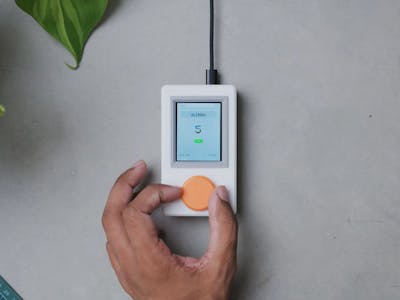
You need one L298N dual H-bridge to spin a motor. A pack of 5 costs barely more than a single module, so you buy the pack, use one, and drop the rest in the parts bin. Do that three times and suddenly you own 8 of them. Akashdeep Singh of The Wrench got tired of that arithmetic and built a bench appliance that answers one question before he opens a shopping cart: do I already have this?
A parts database with a knob on it
The device sits on the workbench and shows a full-color TFT list of components sorted by category. Scroll to the drivers group, see that 8 L298N boards are already on the shelf, and the order never happens. Take one off the shelf and a twist of the dial drops the count to 7. Buy another pack and the count goes back up. No phone, no spreadsheet tab, no app that you forget to open. The whole thing lives in a printed enclosure with an unapologetically iPod-flavored shape.
What is actually inside
The host board is an Arduino UNO Q, which carries a Linux-capable application processor next to a companion microcontroller. That split matters for this build: the parts database, the search, and the interface all run as ordinary Linux software instead of being squeezed into a few kilobytes of MCU RAM. A flat file or a small SQLite table holds every part, its category, and its quantity, and rewriting a record is a normal file write rather than an EEPROM wear calculation.
Input is a Modulino Knob, an encoder-plus-button node that talks I2C over a Qwiic-style connector, so the interface adds zero solder joints. The screen rides on SPI. Between the two buses the wiring stays short, which is what makes a project like this survive on a crowded bench.
Build it yourself
- Brain: an Arduino UNO Q, or any Linux SBC you already own. A Raspberry Pi Zero 2 W runs the same Python and the same SQLite file.
- Screen: a 2.4-inch SPI TFT on an ST7789 or ILI9341 controller. Check whether your module is 3.3 V-only before wiring it to a 5 V board.
- Input: a Modulino Knob on SDA/SCL, or a plain EC11 encoder on two GPIO pins with 10k pull-ups.
- Data: three columns are enough. Category, part name, quantity.
The tricky part is not the hardware, it is discipline: the count is only correct if you turn the dial every time you pull a part. Start the database with the components you reach for weekly, not with all 200 items in the bin. If you want the original build notes, Singh’s write-up is on Hackster, and the L298 datasheet is worth a read while you count how many you own: 2 channels, up to 2 A each, and a motor supply that tolerates 35 V.
Frequently Asked Questions
What runs the parts database on this device?
The Arduino UNO Q carries a Linux-capable application processor alongside a microcontroller, so the parts list runs as ordinary Linux software. A small SQLite table or flat file stores each part with its category and quantity, and updating a count is a normal file write instead of an EEPROM operation.
What parts do I need to build my own version?
A Linux board (an Arduino UNO Q, or a Raspberry Pi Zero 2 W if that is what you own), a 2.4-inch SPI TFT on an ST7789 or ILI9341 controller, and a rotary encoder. A Modulino Knob drops onto I2C with no soldering, or wire a plain EC11 encoder to two GPIO pins with 10k pull-ups.
What will I learn if I build this?
You practice two buses in one project: SPI to drive the display and I2C to read the encoder, which covers most of what you will meet in a thesis build. You also design a small database schema, write create-read-update logic against it, and handle encoder debouncing. Those skills transfer directly to any data-logging or lab-inventory capstone.
