
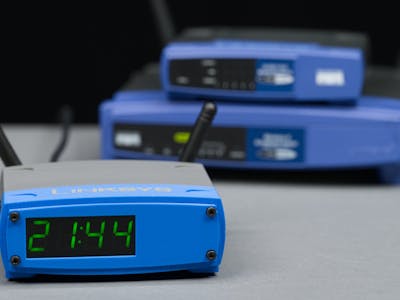
Desk clocks built out of dead consumer hardware have quietly turned into their own genre. Makers have packed displays into old cable modems, rotary phones, and rack switches, and the reason is always the same: the shell already looks like it belongs on a shelf, so the board inside can stay tiny. Glen Akins’ newest build sits right in that lane, rebuilding the blue-and-black Linksys WRT router of the mid-2000s as a network clock that never needs setting.
The build itself
Akins started from an earlier Ars Technica clock that ran on a Raspberry Pi Zero 2 W, then dropped the Linux board for a Seeed Studio XIAO ESP32-S3. That module is 21 x 17.5 mm, carries a dual-core 240 MHz chip with 8 MB of PSRAM, and wakes up in under a second instead of booting a full OS just to read the time. Digits come from a large seven-segment LED backpack sitting behind a semi-translucent acrylic window, and a vinyl logo on the lid finishes the disguise. The time itself arrives over NTP on the LAN, so the clock is right the instant Wi-Fi associates and stays right after a power cut.
The part worth stealing
Wi-Fi provisioning is the real lesson here. A headless ESP32 has no keyboard, so Akins wired a button through a QWIIC connector to kick the board into access point mode. You join that temporary AP from a phone, hand over your SSID and password, and the board reboots onto the real network. QWIIC is just I2C at 3.3 V on a 4-pin JST-SH connector, which means the same port style feeds the HT16K33 display driver at address 0x70. Two devices, one bus, no extra holes drilled in the enclosure. If you have ever fought a captive portal sketch on a breadboard, that button-plus-AP pattern is the shortcut.
What to try next
Start smaller than a full router replica. Wire a XIAO ESP32-S3 to any I2C display, pull the SDA and SCL lines to 3.3 V through 4.7k pull-ups if your module lacks them, and get NTP working with the Arduino configTime() call before you touch CAD. Set your offset to 28800 seconds for Manila time and skip the daylight saving string entirely. Once the digits are correct, the enclosure becomes the fun part rather than the blocker. Akins’ full write-up and photos are on Hackster, and a XIAO ESP32-S3 plus a seven-segment backpack will run you well under PHP 1,500 at circuit.rocks.
Frequently Asked Questions
What board runs this clock?
A Seeed Studio XIAO ESP32-S3, a 21 x 17.5 mm module with a dual-core 240 MHz processor and 8 MB of PSRAM. It replaced the Raspberry Pi Zero 2 W used in the original Ars Technica design, which cut boot time from tens of seconds to under one.
How does the clock get on Wi-Fi without a keyboard?
A button wired through the QWIIC connector forces the ESP32 into access point mode. You join that temporary network from a phone, enter your SSID and password, and the board reboots onto your LAN. After that it pulls the time over NTP on every boot.
What will I learn if I build this?
You will practice I2C wiring on a 3.3 V bus, driving an HT16K33 seven-segment backpack at address 0x70, and handling Wi-Fi credential provisioning on a headless board. Those three skills carry straight into IoT sensor nodes and thesis projects that need a display and network time.
