
Edge AI cameras have gotten scary good at the seeing part. They spot a cracked casting, read a barcode, or count parts on a conveyor without ever phoning a server. The awkward gap has always been the doing part: once the camera decides something, you usually bolt on a PC or a PLC just to flip a relay. A wave of hardware is now closing that gap by putting perception and physical control on the same board, and Luxonis’ new M8 Controller Box is a clean example of where that trend is heading.
What the M8 Box actually is
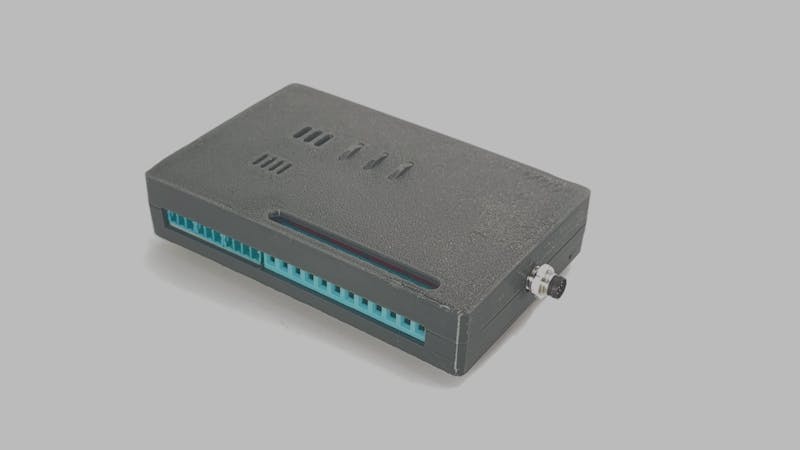
The M8 Box plugs straight into a Luxonis OAK4 vision camera through its M8 connector and hands the camera real-world outputs: GPIOs, relays, a CAN bus, serial, and USB. That means the vision pipeline running on the camera can throw a relay or send a CAN frame the instant it recognizes something, with no intermediary computer in the loop. Luxonis is shipping it as a $249 prototype kit with the box, an M8 cable, DIN rail hardware, and screw terminals.
Here is the part that should catch a microcontroller nerd’s eye: the whole I/O layer is run by a Raspberry Pi RP2040, the same dual Cortex-M0+ chip you find on a Pico. It runs at 133 MHz with 264 KB of SRAM and pulls its 5 V straight from the OAK4 camera, so there is no separate power brick to wire.
The specs worth knowing
Inside the 123 x 78 x 29 mm case you get 16 protected 3.3 V GPIOs, four heavy SPDT latching relays rated to 16 A at 400 VAC, RS232, and CAN 2.0A/2.0B running up to 1 Mbps. Two 3.3 V rails can feed external sensors at a combined 450 mA. The peripherals talk over the u2if (USB-to-interfaces) protocol, and you drive everything from the camera using the oakctl command-line tool. Luxonis’ open-source oak-examples repo already has demos for relay switching, GPIO control, CAN, audio, and barcode detection, so you are not starting from a blank sketch.
What to try next
You do not need a $249 industrial box to chase this idea. Grab a Raspberry Pi Pico, wire a relay module to a GPIO through a transistor, and have a small vision model on an ESP32-CAM or a Pi trigger it over serial. That is the same perception-to-action loop the M8 Box sells, just at student-budget scale, and it is a strong capstone build for anyone eyeing machine vision. Read the full breakdown on Hackster, then decide whether your next robotics project really needs that extra PLC.
Frequently Asked Questions
What microcontroller runs the M8 Box’s inputs and outputs?
How much does it cost and what comes in the kit?
The prototype kit is $249 and includes the M8 Controller Box, an M8 cable, DIN rail mounting hardware, and plug-in screw terminals. Interfaces like CAN, USB, GPIO, relays, UART, and LEDs are supported; the isolated strobe output and I2C/SPI/ADC are still in progress.
What will I learn if I build a version of this myself?
You will practice wiring a relay to a microcontroller GPIO through a transistor, driving a CAN bus, and closing a perception-to-action loop where a vision model triggers real hardware. That covers embedded I/O, safe relay switching, and machine vision integration, all solid capstone skills.
