
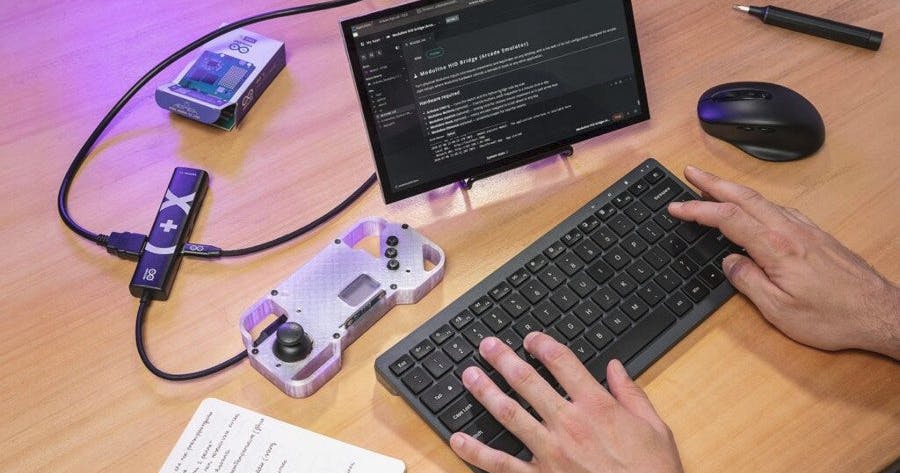
What does it actually take to build your own arcade cabinet in an afternoon? Arduino’s answer is one board and a step-by-step guide. The new UNO Q Arcade bundle packs almost everything you need to turn the UNO Q into a working retro games console, following the same DIY-kit format as the earlier UNO Q Synth bundle.
What comes in the box
The bundle is built around the 4GB RAM version of the Arduino UNO Q, plus three Modulino nodes: Buttons, Joystick, and Movement. Those Modulinos snap on over I2C using Qwiic connectors, so there is no soldering to get your controls wired up. The guide walks you through installing RetroArch, the popular emulation front-end, so a single board can stand in for a whole shelf of classic consoles, home computers, and arcade machines. Want to make games instead of just playing them? The UNO Q also runs the open-source Godot engine for native titles.
Why the UNO Q can pull this off
The UNO Q is a real break from the rest of the UNO family. Alongside an STMicroelectronics STM32U585 microcontroller, it carries a Qualcomm Dragonwing QRB2210, a quad-core Arm Cortex-A53 system-on-chip. That “dual-brain” layout means the board boots straight into a Linux OS and behaves like a full single-board computer. The Arcade bundle leans entirely on the Linux side: the Dragonwing chip does the emulation heavy lifting while the STM32 microcontroller stays free for real-time input. Watch two things on cost. The kit lists at $113.64 (dropping to $90.90 with the 20% launch discount), and it does not include the Arduino USB-C Hub you need for HDMI output, which is a separate $16.34.
Try it yourself
The one part the bundle skips is the housing. Arduino ships the design files, but you print the handheld shell yourself, so budget a few hours at the printer. For a school robotics club or an ECE elective, this is a tidy intro to Linux on embedded hardware, I2C peripherals, and emulator configuration all in one build. Read the full bundle breakdown on Hackster before you order, and add the USB-C Hub to your cart, or you will end up with a console that has nowhere to show the picture.
Frequently Asked Questions
What handles the game emulation on the UNO Q Arcade bundle?
The Qualcomm Dragonwing QRB2210, a quad-core Arm Cortex-A53 chip, runs RetroArch on the board’s Linux side and does the emulation work, while the STM32U585 microcontroller handles real-time input.
How much does the full setup cost?
The bundle lists at $113.64, or $90.90 during the 20% launch discount. You also need the Arduino USB-C Hub for HDMI output at $16.34, and you 3D print the handheld case yourself from the included design files.
What will I learn if I build this?
You get hands-on practice with Linux on embedded hardware, wiring I2C peripherals over Qwiic connectors, configuring the RetroArch emulator, and assembling a working handheld from loose modules. It maps neatly onto a school robotics club or ECE elective project.
