
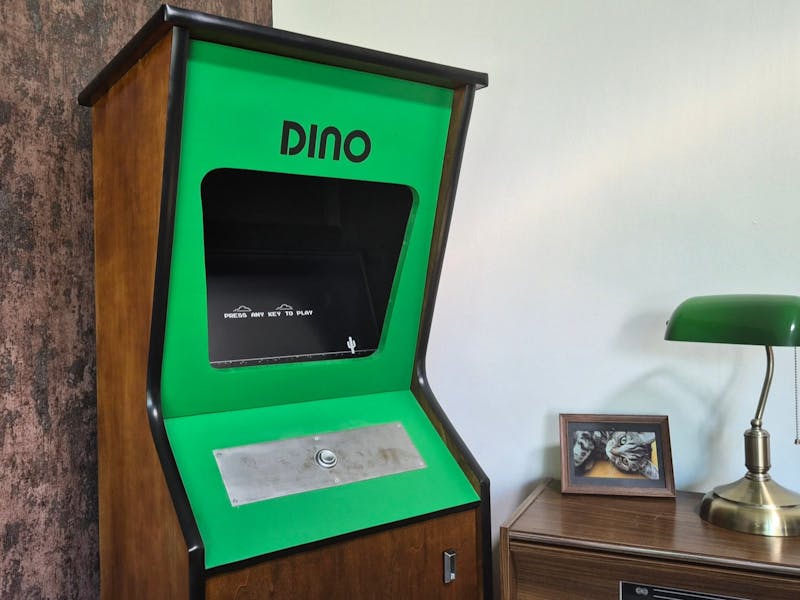
The Wi-Fi drops, a little pixel Tyrannosaurus starts running across a blank browser tab, and you tap the spacebar to keep it hopping over cacti. That offline Chrome screen is the accident a hardware hacker named Paul turned into a full arcade cabinet, so he can play the Dinosaur Game whether or not the connection ever comes back.
What Paul actually built
Instead of cloning Atari’s original Pong cabinet at full size, Paul shrank it from 600 mm down to 450 mm wide so it fits in a home office. A 19-inch 4:3 Dell LCD sits where a bulky CRT would have gone, framed with black T-molding, a coin slot, a lock, and a custom serial plate modeled on real Atari hardware. Inside, the electronics are almost comically simple: a Raspberry Pi 3 Model B, a single 24 mm arcade button, and a pair of Logitech speakers. All that empty space became hidden storage, including a compartment tucked behind the hinged coin slot.
How the software ties it together
The Pi boots straight into a fullscreen version of the game using FullPageOS, a kiosk-mode Raspberry Pi image that launches Chromium on startup. High scores are saved locally, permanent dark mode helps the page vanish into the black cabinet, and CRT-style scanlines fake the old monitor look. The 24 mm button wires to a single GPIO pin with a pull-up, so one press is the entire control scheme. Paul also fires a webhook to Home Assistant when a game ends, and after 10 seconds of no input the cabinet plays itself, copying the attract mode on classic machines.
Why it is a good first cabinet build
This is a friendly project for a school robotics club or a capstone team because the electronics stay minimal while the fabrication teaches real skills. You get GPIO input handling, Linux kiosk configuration, and a home-automation webhook, without needing to write a game engine from scratch. Paul is already planning a faster board for heavier CRT effects and motion sensing to wake the screen. A Raspberry Pi 3 and a 24 mm arcade button from circuit.rocks are enough to start your own version. Full build details are on the Hackster writeup, and the kiosk image lives at the FullPageOS repo.
Frequently Asked Questions
What hardware runs the Dinosaur Game inside the cabinet?
A Raspberry Pi 3 Model B boots FullPageOS into a fullscreen Chromium browser, and a single 24 mm arcade button wired to one GPIO pin handles the jump. A pair of Logitech speakers cover the sound effects.
What parts would I need to build a similar cabinet?
A Raspberry Pi 3, a 19-inch 4:3 LCD, one 24 mm arcade button, small speakers, and a plywood cabinet with black T-molding. The 450 mm-wide scaled-down design keeps the material list and desk footprint small.
What will I learn if I build this?
You practice GPIO button input with a pull-up, Linux kiosk configuration through FullPageOS, and firing a Home Assistant webhook when the game ends, plus basic enclosure fabrication. It is a low-code way into embedded Linux and home automation.
