
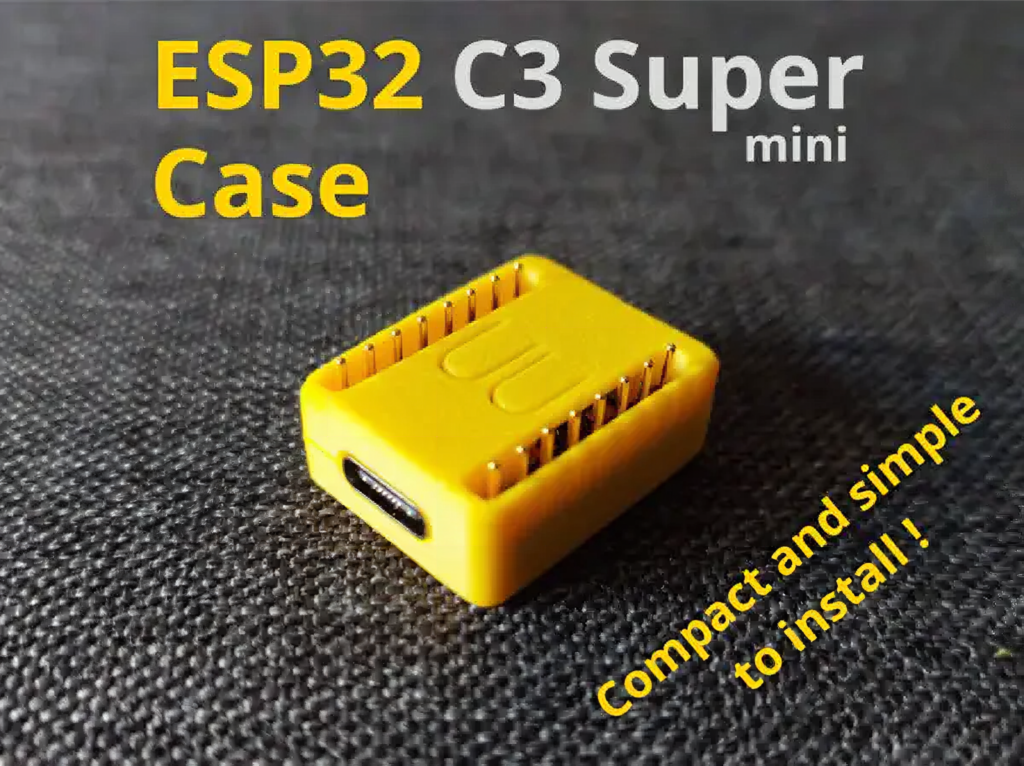
Bare microcontroller boards are having a moment. The ESP32-C3 Super Mini has become one of the most-cloned little dev boards around: it’s cheap, it has Wi-Fi and Bluetooth LE built in, and it’s small enough to tuck almost anywhere. The catch is that a naked PCB with exposed pins is fragile, hard to mount, and easy to short against a stray bit of metal. That’s exactly the gap the maker community keeps filling with 3D-printed enclosures, and a new snap-fit case from designer 4Designs is a tidy example of the trend.
The build
Shared on MakerWorld, the case is a two-piece shell sized specifically for the ESP32-C3 Super Mini. The workflow is refreshingly fiddle-free: you drop the board into the lower half, press gently near the USB-C port until it clicks home, then slide the top cover over it. No screws, no glue, no heat-set inserts. One detail worth flagging is that the design assumes the header pins are soldered onto the top face of the board, so check your build orientation before you print.
Why snap-fit is the clever part
A good snap-fit enclosure lives or dies on tolerances. The cantilever clips have to flex just enough to grab the board, then hold it without cracking after a few open-and-close cycles. Designing around the USB-C cutout matters too, since that port takes the mechanical stress every time you plug in a cable. Print it in PLA or PETG with a sensible wall count and the friction fit does all the work, which is why these cases travel so well across different printers and filament brands.
What to try next
Once your Super Mini has a home, the obvious next step is to give it a job: a pocket Wi-Fi sensor node, a BLE beacon, a tiny MQTT publisher feeding a home dashboard. If you’re comfortable in CAD, fork the model and add a slot for an OLED, a cutout for a reset button, or a lug for a lanyard. Snap-fit cases are a great gateway into enclosure design precisely because the payoff is immediate and the parts cost is basically a few grams of filament.
Frequently Asked Questions
How does the snap-fit case hold the ESP32-C3 Super Mini in place?
The board drops into the lower half and is held by cantilever clips near the USB-C port. You press until it clicks, then slide the top cover on. No screws, glue, or inserts are needed, just a clean friction fit.
What do I need to print this case and how much does it cost?
Just a few grams of PLA or PETG on any FDM printer, so it’s effectively pennies in filament. The model assumes the header pins are soldered on the top face of the board, so confirm your build orientation before printing.
What will I learn if I build this?
You’ll pick up the fundamentals of snap-fit enclosure design: clip tolerances, wall thickness, designing around a USB-C cutout that takes mechanical stress, and matching a case to a specific PCB footprint. It’s an approachable first step into CAD and functional 3D printing.
