
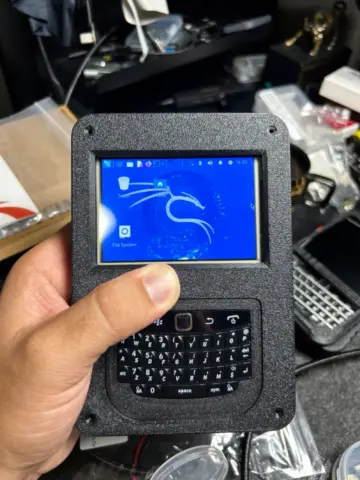
Pocket-sized Linux just got a serious upgrade. The PiBerry 2.0 is an open-source handheld cyberdeck that packs a full little computer into a 3D-printed shell you can build at your own bench this weekend.
Designed by maker CarbonCyber and shared with the 3D printing community, the PiBerry 2.0 wraps a Raspberry Pi Zero 2W in a compact, modular case with a 3.5-inch touchscreen on the front. The design files are freely available, so anyone with a printer and a little patience can roll their own. It is aimed squarely at people who want a grab-and-go terminal — think portable cyberdeck experiments or Kali Linux fieldwork on the move.
What is under the hood
At the heart of the build is the Raspberry Pi Zero 2W, a quad-core board small enough to disappear inside the printed enclosure yet capable of running a full Linux environment. The 3.5-inch touchscreen handles both display and input, while USB keyboard support means you can plug in a compact keyboard for real typing instead of fighting an on-screen layout. The modular case design makes it easy to route cables cleanly, swap panels, and reprint a single part if you want to tweak the layout later.
It is a tidy example of how far a sub-$20 board can go when you give it the right enclosure. No exotic parts, no custom PCBs — just a well-thought-out case and a board that punches well above its size.
Cyberdecks have become a favourite weekend project in the maker scene, and the PiBerry leans into that ethos: everything is printable, the electronics are off-the-shelf, and the whole thing is small enough to slip into a jacket pocket. Whether you want a discreet pentesting companion, a retro-styled terminal, or just a quirky Linux toy to tinker with, the compact form factor invites experimentation without a big parts bill.
Build it yourself
Want to make one? You will need a Raspberry Pi Zero 2W, a 3.5-inch touchscreen, a USB keyboard, and a 3D printer to produce the modular case. Flash your favourite Linux image — Kali is a popular pick for this kind of rig — assemble the printed panels, and you have got a handheld terminal of your own. You can grab boards and accessories over at Circuit.Rocks to get the build started.
Frequently Asked Questions
What board powers the PiBerry 2.0?
It runs on the Raspberry Pi Zero 2W, a compact quad-core board that fits inside the 3D-printed case and can run a full Linux environment such as Kali.
What do I need to build one?
A Raspberry Pi Zero 2W, a 3.5-inch touchscreen, a USB keyboard, and a 3D printer for the modular case. The case design files are open source and free to download.
What will I learn if I build this?
You will get hands-on practice with single-board Linux setup, wiring a touchscreen and USB peripherals, and assembling 3D-printed enclosures, plus the basics of putting together a portable cyberdeck.
