
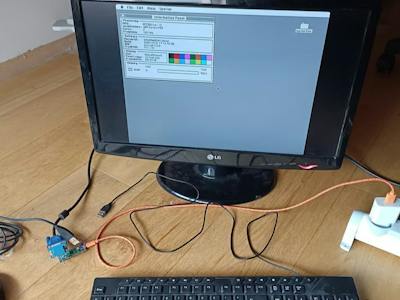
A 1985 home computer had a few hundred kilobytes of RAM and a mouse-driven desktop was a luxury. Today a microcontroller that costs less than a lunch has more raw speed than those machines, yet most hobby boards still boot into a blinking LED sketch. A growing set of builders now treat the chip as a tiny desktop PC, and Sylphide OS is one of the most complete examples so far.
What Sylphide OS actually is
Developer Thomas Capricelli wrote Sylphide OS as an open source system that gives cheap microcontrollers a graphical desktop with windows, a window manager, menus, desktop icons and an info panel. It does not emulate any old machine. The goal is the cramped, hands-on feel of 1980s computing, built from modern parts. The project sits at version 0.1, so storage, networking, widgets and loading external programs are still on the to-do list.
The hardware and the design rules
Three targets work today: the Olimex ESP32-P4-PC as the flagship, a minimal Raspberry Pi Pico 2 build on the RP2350 with VGA and USB, and FabGL-style boards with VGA out and PS/2 input. There is also a Linux emulator, handy when you have no board on your desk. Under the hood, FreeRTOS schedules tasks while the project code handles drivers, drawing and the interface, written mostly in C and C++ with a little assembly for platform-specific drivers.
The detail worth stealing is the framebuffer. Capricelli insists on a real one in RAM rather than generating the video signal on the fly, which keeps drawing code simple and lets monochrome or tiny-RAM boards share the same stack. Without an MMU, these chips cannot run Linux, so a small RTOS plus a framebuffer is the practical route.
What to try next
Start with the emulator, then read how the window manager redraws only the dirty rectangle. That one habit saves bandwidth on a 640×480 VGA output. If you own a Pico 2, wire a resistor-ladder VGA DAC to three GPIO pins and a USB keyboard through the OTG port, then compare the build against the repository linked from the original Hackster write-up. For a thesis or capstone, porting Sylphide to one more board is a well-scoped task. Pico 2 boards are stocked at circuit.rocks.
Frequently Asked Questions
Which boards can run Sylphide OS?
The Olimex ESP32-P4-PC is the flagship target. A minimal Raspberry Pi Pico 2 (RP2350) setup with VGA and USB also works, along with FabGL-style hardware using VGA output and PS/2 input. A Linux emulator is available for development.
Why can’t these microcontrollers just run Linux?
Linux needs a memory management unit and more RAM than most microcontrollers offer. Sylphide OS instead uses FreeRTOS for task scheduling and a RAM framebuffer, which fits chips without an MMU.
What will I learn if I build this?
You pick up RTOS task scheduling, framebuffer graphics, VGA signal output, USB and PS/2 input handling, and how to structure a C and C++ project that targets several boards from one codebase.
