
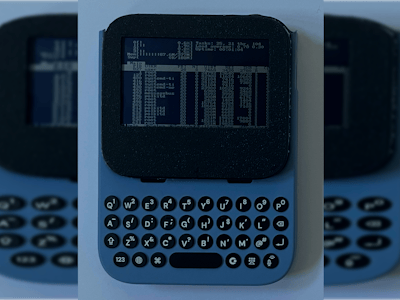
Here is the shopping list: one MF800 4G pocket hotspot (under $20, roughly PHP 1,100), a USB keyboard small enough to hold in two hands, an Adafruit Sharp Memory Display breakout, a handful of small ICs for a custom adapter board, jumper wire, and a steady soldering iron. With those parts, maker Borna Kovač turned a throwaway travel router into a pocket Linux messenger with built-in 4G, Wi-Fi, and Bluetooth.
What he built
Raspberry Pi boards used to make router hacking pointless. With SBC prices climbing, that math is shifting again. The MF800 is one of several cheap hotspots supported by the OpenStick project, which lets you swap the stock Android for a real Linux install. Out of the box it already packs a battery, a 4G modem, and radios. Kovač pulled the Android device tree over ADB before wiping it, which gave him a map of how the hardware was wired. He paired the board with a Clicks keyboard (built for the iPhone 16 Pro Max, but plain USB underneath) and a monochrome Sharp Memory Display to build a dedicated messaging handheld.
The tricky parts
- PCB surgery. The hotspot board was too wide for the keyboard case, so he cut away unused sections. One cut broke the battery trace, fixed with a single jumper wire.
- Adapter PCB. A custom board uses a TUSB320 for USB host/device switching, an SN74LVC8T245 level shifter for the display signals, an MCP1640 boost converter to lift the single-cell battery (about 3.7V) up to 5V, and TPS22917 load switches to cut power to idle parts.
- Display driver. He found the SPI pins in the extracted device tree and adapted an existing Linux DRM driver, so the Sharp panel shows up as a normal framebuffer instead of a special-case device.
- Dithering. The stock driver snapped every pixel to pure black or white. Adding Atkinson and Floyd-Steinberg dithering made photos and video readable on the 1-bit panel.
Sleep support and a proper power button are still on the to-do list, so treat this as a working prototype rather than a finished product.
Why this matters for your next project
For ECE students hunting for a thesis idea, this build covers a full semester of skills in one device: reading a device tree, flashing firmware, level shifting between 1.8V or 3.3V logic domains, boost converter layout, and patching a kernel driver. The gotcha to plan for is the device tree dump. Grab it before you reflash, because once Android is gone, so is your easiest pin map. Start by checking the OpenStick supported-device list at github.com/OpenStick/OpenStick, then read Kovač’s build notes via the original Hackster write-up.
Frequently Asked Questions
How does a 4G hotspot end up running Linux?
The MF800 is supported by the OpenStick project, which provides Linux images for several cheap Qualcomm-based hotspots. You enable ADB on the stock Android firmware, back up the device tree, then reflash the device with a Linux build.
What parts beyond the hotspot does the build need?
A USB keyboard (Kovač used a Clicks iPhone keyboard), an Adafruit Sharp Memory Display, and a custom adapter PCB with a TUSB320 USB-C controller, SN74LVC8T245 level shifter, MCP1640 boost converter, and TPS22917 load switches, plus basic soldering tools.
What will I learn if I build something like this?
You’ll practice reading a Linux device tree, reflashing embedded firmware, designing a small power and level-shifting PCB, wiring an SPI display, and adapting a kernel display driver. Those are the same skills used in industry embedded Linux work and make a strong ECE capstone foundation.
