
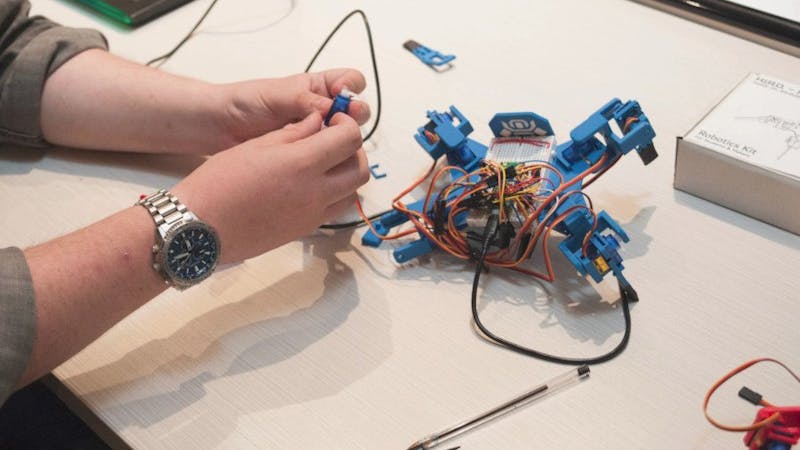
Classroom robot kits spent years drifting toward sealed plastic shells with three screws and a phone app. The swing back is on: kits that arrive as a bag of servos, resistors and a bare microcontroller, where the student does the wiring. Takamori Robot’s second-generation HIRO lands squarely in that camp, and it swaps in the RP2350-based Raspberry Pi Pico 2 to do it.
What HIRO actually is
HIRO (Model TR-01-A, Standard Edition) is a spider-style quadruped that you assemble yourself. Founder Joseph Casebeer ran a first campaign on the older Pico W, and the Gen 2 revision moves to the Pico 2 while switching to tougher frame materials. The pitch is repairability: you build it, you wire it, you pick what firmware runs on it. Assembly is quoted at 20–30 minutes, which puts it inside a single lab period.
The parts list is the lesson plan
At the centre sits a “Cortex” carrier board hosting the Pico 2, with eight motor-control headers and four mounting points for the bundled SG-90 servos. Around it: a six-axis TDK MPU-6050 IMU on I2C (SDA/SCL, and yes, check your pull-ups), five photoresistors, five push-buttons, ten LEDs, two piezo buzzers, plus resistors, cabling and a small solderless breadboard.
That spread is the interesting part for a thesis or capstone group. One kit covers analog reads from an LDR divider, GPIO debouncing on the buttons, PWM on four servo channels, and I2C sensor fusion from the MPU-6050 — four separate topics that usually need four separate modules. The RP2350 has the headroom for it too, running dual Cortex-M33 cores at 150 MHz against the RP2040‘s 133 MHz.
Worth watching, worth borrowing
Two caveats. Backer rewards start at $149 for the full kit or $60 for the Cortex board alone, and hardware is slated to ship in June 2027, so this is a long wait. And while the family is described as open source, the hardware design files are not out; only the movement library is on GitHub under MIT.
You do not have to wait for the Kickstarter to try the idea. A Pico 2, four SG-90s and an MPU-6050 will get a walking gait onto your bench this weekend, and the MIT-licensed movement library is readable enough to borrow the inverse-kinematics maths from. Read the full campaign write-up at Hackster, then start with one leg: two servos, GPIO 0 and 1, and a sweep loop. If the leg jitters at rest, feed the servos from a separate 5 V rail rather than the Pico‘s VBUS pin.
Frequently Asked Questions
What microcontroller and sensors does the HIRO Gen 2 robot use?
The Cortex carrier board hosts a Raspberry Pi Pico 2 (RP2350, dual Cortex-M33 at 150 MHz), replacing the Pico W RP2040 used in the first generation. Onboard it carries a six-axis TDK MPU-6050 IMU on I2C, five photoresistors, five push-buttons, ten LEDs and two piezo buzzers, with eight motor-control headers driving four bundled SG-90 servos.
How much does the kit cost and when does it ship?
Kickstarter rewards start at $149 for the complete kit on launch day, or $60 for the Cortex board on its own. Hardware is slated to ship in June 2027. If that wait is too long, a Pico 2, four SG-90 servos and an MPU-6050 will reproduce most of the platform on a breadboard now, since the movement library is on GitHub under the MIT licence.
What will I learn if I build this?
Four skills at once, which is why it works well for a capstone or robotics-club project: reading analog voltages from photoresistor dividers, debouncing GPIO inputs on the push-buttons, generating PWM on four servo channels at the same time, and pulling accelerometer and gyro data over I2C from the MPU-6050. You also get soldering and wiring practice, plus the inverse-kinematics maths behind a four-legged walking gait.
