
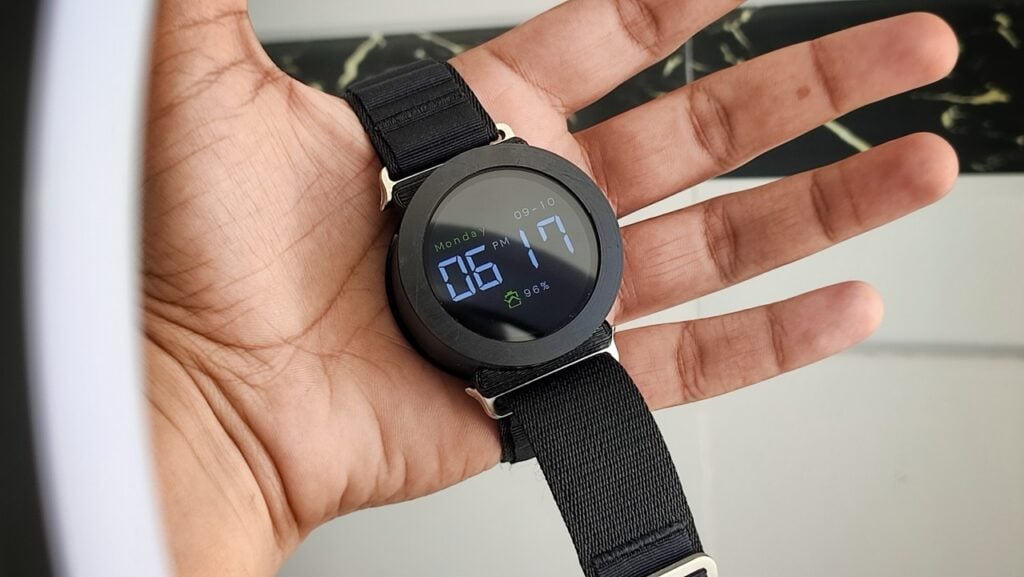
Vishal Soni had wanted a smartwatch of his own since he was a kid. When he finally sat down to build one, he threw out nearly everything a modern watch tries to do, no step counting, no notifications, no health graphs, and kept the single thing a watch actually owes you: the time.
The result is the ChronoWatch X2040, a round-faced timepiece running on an RP2040 microcontroller. Rather than copy the squared-off Apple Watch look, Vishal went classic and circular, which first steered him toward designing a custom PCB. He dropped that plan after finding a Waveshare Round Touch LCD with the RP2040 already integrated, freeing him to spend his energy on code instead of board layout. A 3.7V 950mAh battery connects over an MX1.25 2P plug, the board handles its own USB-C charging, and a Tinkercad-designed case with an Apple Watch strap wraps up the hardware.
Learning the Pico SDK the hard way
Coming off years of Arduino, Vishal jumped straight into pure C on the Pico SDK, where the library safety net is a lot thinner. The touchscreen was the sticking point. He wrote his own functions to detect whether a specific region of the screen had been tapped, which made the whole interface far easier to build. From there the feature list grew: swappable watch faces, a 12- and 24-hour toggle, adjustable brightness, a stopwatch, screen rotation, and a sleep mode. The Waveshare board also carries a built-in accelerometer and gyroscope, so motion gestures are on the table for a later version.
The one real gotcha: no RTC
Deep sleep is where the build fights back. With no real-time clock module on board, dropping the RP2040 into deep sleep wipes the current time and date, so idle power draw stays higher than Vishal would like. His to-do list is refreshingly specific: add an RTC to hold time while the watch is off, slim down the case, shrink the battery, and eventually fold in an alarm and a step counter.
Want to build your own? Start with a Waveshare RP2040 round touch display, a small LiPo cell, and the Pico SDK C examples. Read Vishal’s full write-up on Hackster and skim the RP2040 details before you solder the battery leads. And if your deep-sleep clock keeps resetting on you, take that as your cue to design in an RTC like a DS3231 from day one.
Frequently Asked Questions
What microcontroller powers the ChronoWatch X2040?
It runs on the RP2040, using a Waveshare Round Touch LCD module that has the chip and a circular display built in, so there is no custom PCB to fabricate.
Why does the watch lose the time when it sleeps?
The board has no real-time clock (RTC) module, so a deep-sleep cycle wipes the current time and date. Adding an RTC such as a DS3231 keeps the clock running while the RP2040 is powered down.
What will I learn if I build this?
You will practice programming in C with the Pico SDK, write custom touch-detection functions, wire a LiPo battery safely over a JST connector, and work with an onboard accelerometer and gyroscope, skills that carry over to any embedded or wearable project.
