
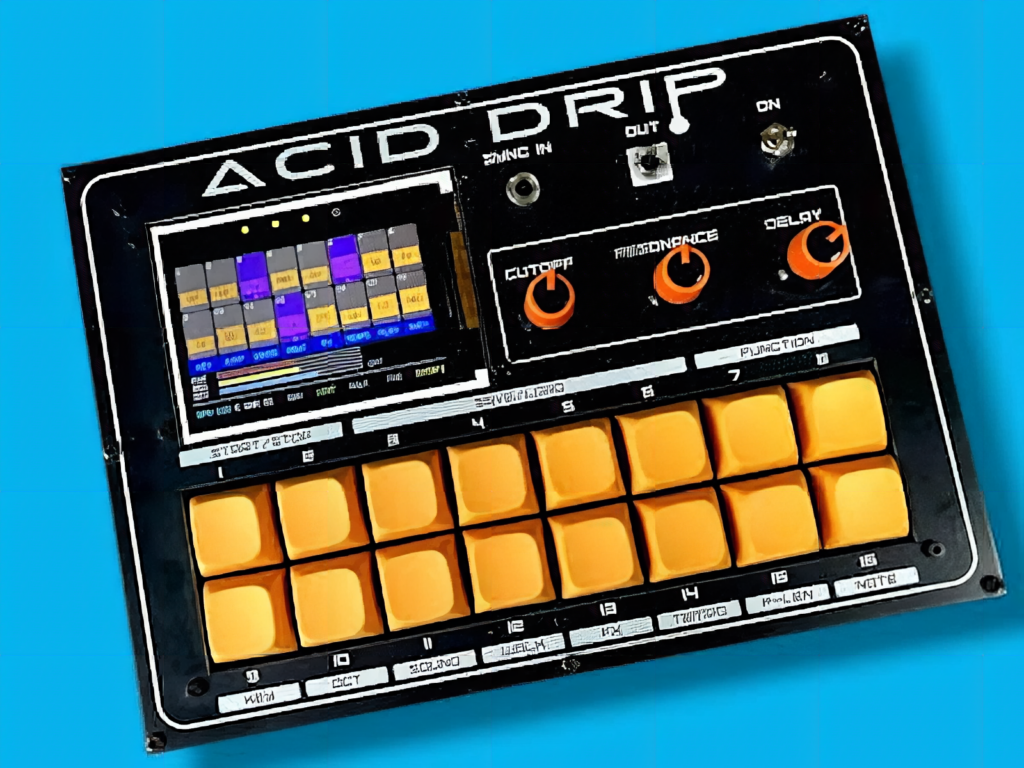
Want to clone one of the most iconic synths in electronic music without remortgaging your house? Here’s the shopping list: an RP2040 board (a Raspberry Pi Pico works fine), a 320×240 ILI9341 TFT display, sixteen Cherry MX switches, three potentiometers, a lithium-ion cell with a charge-and-boost circuit, and a pair of custom PCBs. That’s roughly the bill of materials maker Marcus Dunn pulled together to build Acid Drip, a pocketable take on the legendary Roland TB-303.
What Acid Drip actually is
The original TB-303 earned cult status in house and techno for its squelchy, resonant basslines — and a price tag to match its legend. Dunn skipped the analog rabbit hole entirely. Rather than rebuilding the op-amps, transistors, and finicky filters that defined the old hardware, he recreated the sound in software and wrapped it in an interface designed for fast, hands-on experimentation. The result is a clone that’s far easier to play than the temperamental original, while still nailing that unmistakable acid character.
How it works under the hood
Audio synthesis runs on the RP2040 using the Mozzi library, and the chip’s two cores split the load: one keeps the bass voice and drum machine generating sound while the other handles sequencing and display updates. Three pots give live control over cutoff, resonance, and decay, so you can sculpt the filter while a pattern plays. A built-in drum section adds eight instruments across sixteen rhythm presets, there’s a 3.5 mm output, and a sync input locks it to external gear. Patterns and settings persist in EEPROM.
- Brain: dual-core RP2040 running Mozzi firmware
- Controls: 16 Cherry MX keys (sequencer steps plus menus) and 3 pots
- Power: Li-ion cell with charge and boost circuit for true portability
Worth a weekend?
Because the build leans on through-hole parts and custom PCBs, it’s approachable for anyone with basic soldering chops — no surface-mount wizardry required. The keys double as sequencer steps and menu buttons, so accents, glides, note-walk modes, and a stash of hidden acid-house presets are all a tap away. If you’ve ever wanted a portable acid machine that’s genuinely fun to play, this is a brilliant place to start.
Frequently Asked Questions
What microcontroller powers the Acid Drip synth?
It runs on a dual-core RP2040 (a Raspberry Pi Pico-compatible board) using the Mozzi audio synthesis library. One core generates the bass voice and drums while the other handles sequencing and the display.
How hard is Acid Drip to build at home?
It’s beginner-friendly for the soldering-iron crowd. The custom PCBs use mostly through-hole components, so you only need basic soldering experience — no surface-mount work — plus a TFT display, 16 Cherry MX switches, three pots, and a Li-ion power circuit.
What will I learn if I build this?
You’ll get hands-on practice with RP2040 firmware, real-time audio synthesis and dual-core scheduling, reading potentiometers and a matrix of switches, driving an ILI9341 TFT, saving state to EEPROM, and designing PCBs plus a portable Li-ion power supply — a well-rounded embedded-audio project.
