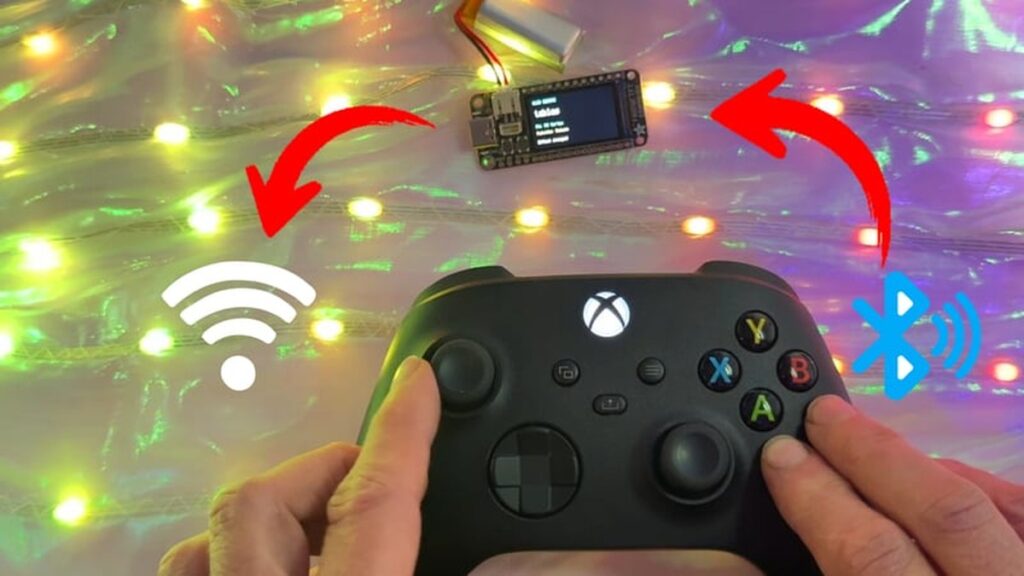
What happens when you hand your WLED light show an Xbox controller instead of a phone? Erin St Blaine’s new Adafruit guide answers that with a build that pairs a Feather ESP32-S3 TFT to an official Xbox Wireless Controller over Bluetooth, then drives every WLED device on your Wi-Fi from the sticks and buttons.
What the remote actually does
Power up the Feather and it joins your Wi-Fi, then uses mDNS to find anything advertising the _wled._tcp service. Each discovered device shows up by name on the built-in TFT under a “WLED REMOTE” heading, next to the current effect and palette. Press the D-pad left or right to move between projects and the selected strip blinks warm yellow twice (RGB 255, 185, 35) so you know which lights are listening. The existing WLED firmware and wiring stay untouched; the remote only talks to the JSON API WLED already exposes.
The left stick steps through effects (left/right) and palettes (up/down), one step per flick. The right stick handles brightness vertically and cycles saved presets or playlists sideways. A toggles power, B recalls the boot preset, X saves the current look into the first free preset slot out of 250, and the right trigger switches WLED’s UDP sync on and off so several installations can follow one leader.
How it talks to the controller and the lights
The code skips the usual adafruit_ble and adafruit_hid libraries. It uses the lower-level _bleio module directly, subscribing to the controller’s HID service (UUID 0x1812) and its report characteristic (0x2A4D) with notifications on. Every stick move arrives as a raw HID report decoded by byte offset, which is the tricky bit: the offsets were only tested on one controller model, so a Series X|S pad is the safe pick.
On the Wi-Fi side, the Feather sends plain HTTP calls through adafruit_requests: GET and POST to /json/state, plus reads of /json/eff, /json/pal and /presets.json to fill the screen. The two-flash confirmation waits 0.35 s after your last D-pad press before firing, so a quick scroll past five devices only flashes the one you land on, and each blink holds for 0.14 s before the original segment state is restored. One gotcha: the Feather keeps its own cache of each device’s state, so changes made in the WLED phone app will not show on the TFT until you rescan with D-pad up.
Try it
You need a Feather ESP32-S3 TFT (Adafruit product 5483, about US$24.95), an official Xbox Wireless Controller, CircuitPython 10.3 or newer, and the adafruit_requests, adafruit_connection_manager and adafruit_display_text libraries in the lib folder. Flash the board with the web installer (pick Full Install so TinyUF2 updates on the 4 MB flash board), put your Wi-Fi SSID and password in settings.toml, hold the controller’s pairing button until the Xbox logo flashes fast, and the remote finds your lights on its own. The full CircuitPython code is at learn.adafruit.com/control-wled-with-an-xbox-controller, and it works with any WLED build already running in your dorm or classroom, including an ESP32 dev board driving a WS2812B strip from circuit.rocks.
Frequently Asked Questions
Do I need to change my existing WLED setup to use this remote?
No. The Feather talks to the WLED JSON API that every WLED install already exposes over Wi-Fi, and it finds devices through mDNS. Your strips, firmware and wiring stay exactly as they are; you only add the controller and the Feather on the same network.
Will a PlayStation or Nintendo Switch controller work instead of an Xbox pad?
Not with this code. It reads raw BLE HID reports from the controller’s 0x1812 service and decodes them by byte offset, and those offsets were tested only on the official Xbox Wireless Controller (Series X|S). Other pads use different report layouts or do not use BLE HID at all.
What will I learn if I build this?
Low-level Bluetooth LE in CircuitPython using _bleio and HID notifications, service discovery with mDNS, calling a REST-style JSON API with adafruit_requests, drawing a small UI with displayio on a TFT, and handling state caching and debouncing on a microcontroller, all skills that carry over to IoT thesis and capstone projects.
