
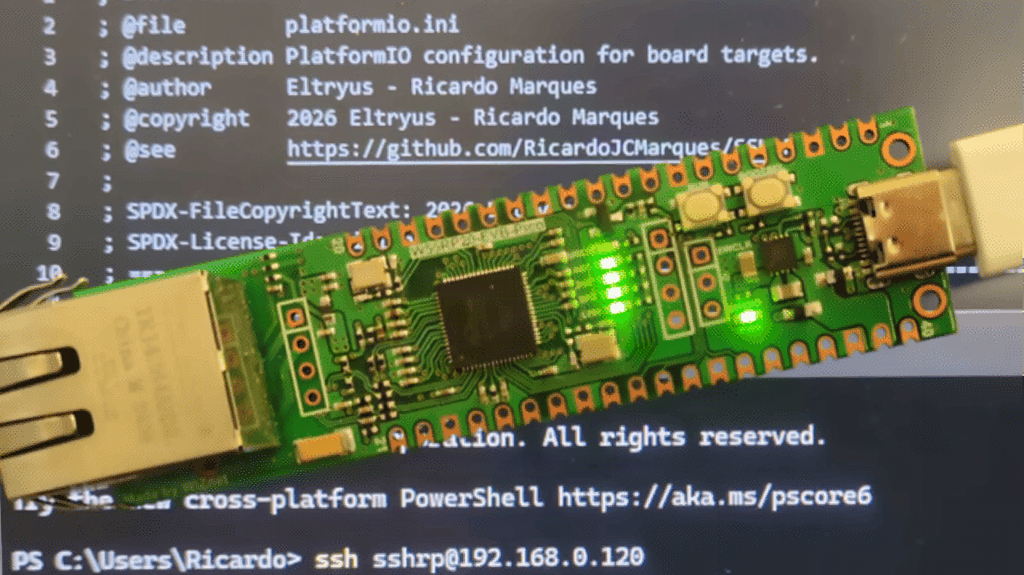
Picture a lab bench at 11 PM, a thesis demo due in the morning, and a board that only talks over a USB cable you keep unplugging by accident. Ricardo Marques went the other way: he made an RP2040 answer to ssh over plain Ethernet, as Hackster.io reported.
What did he actually build?
Marques wrote custom firmware that turns a WIZnet W5500-EVB-Pico into a tiny SSH server. That board pairs the RP2040 (dual-core Arm Cortex-M0+, 133 MHz) with a W5500 Ethernet controller and an RJ45 jack. Log in from any laptop on the same network as user “sshrp”, accept the host key fingerprint, and you get a shell that can turn the onboard LED on, off, or blinking, and report its state.
How is it put together?
The project is built in PlatformIO. It layers an SSH module and a TCP/IP stack on top of the existing Arduino-Pico Ethernet drivers, so the W5500 talks to the RP2040 over SPI. Setup is short: clone the GitHub repo, pick an unused static IP on your LAN (or keep the default), generate your keys, build, and flash. The gotcha is the address. If it collides with another device, SSH will fail in confusing ways, so ping it first.
One LED is a modest payoff, and the author says as much. The real value is the pattern: authenticated, encrypted remote control with no Wi-Fi password and no Bluetooth pairing. Swap the LED command for a relay on GPIO 15 or an SDA/SCL sensor read, and the same shell becomes a lab-bench controller.
What’s the takeaway for a classroom or thesis build?
Wired Ethernet is boring and that is the point: it keeps working in a school lab where 40 phones are fighting over the access point. A plain Raspberry Pi Pico is about PHP 250 at circuit.rocks, and a separate W5500 module adds a few hundred more. Start by getting the LED commands working, then add one sensor command of your own.
Frequently Asked Questions
What hardware does the RP2040 SSH server use?
What can you do once you SSH into the Pico?
In the original demo you can switch the onboard LED on or off, make it blink, or query its status. You can extend the commands to relays or sensors.
What will I learn if I build this?
You will learn PlatformIO builds, SPI-connected Ethernet controllers, static IP planning, SSH key generation, and how to design a simple command interface for a microcontroller.
