
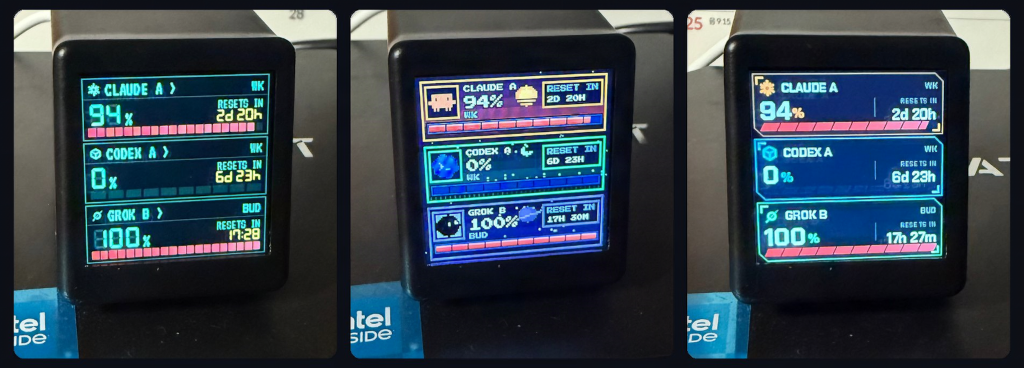
Picture a 1.54-inch screen on your desk that shows your server load, your lab’s room temperature, or the day’s classroom schedule, and you never touched a soldering iron to get it there. That is the scene Yongha Kim set up with a GeekMagic SmallTV, a cheap ESP8266 or ESP32 gadget sold with a ready-made plastic case.
What got built
Most SmallTV hacks start by flashing new firmware. This one skips that. Kim keeps the stock software and uses its built-in photo viewer, so the device shows whatever picture you send it. The write-up on Hackaday is at hackaday.com, and in the demo the screen shows live AI coding-tool usage numbers, though any data works.
How it works
A computer on your network renders an image, then pushes it to the SmallTV over HTTP. Kim draws the picture in Python with the Pillow library. The screen is 240×240 pixels, so you make a 240×240 image and send it. GIF files are accepted too, which means simple animation is possible.
The gotcha is that the display is dumb. The computer does all the drawing, so if that machine sleeps, the screen freezes on the last frame. Run the script on something always on, like a Raspberry Pi, and refresh every 30 to 60 seconds so the small ESP chip is not hammered with uploads.
Because it is plain HTTP on your LAN, any language that can POST a file will do. A few lines of code snippet in Python, Node, or even curl from a cron job can drive it, and a library like Pillow handles fonts and charts.
The takeaway
The lesson for students: you do not always need to rewrite firmware to make hardware useful. If you want a build you can wire yourself, an ESP32 board with a 240×240 SPI TFT on GPIO pins like 18 (SCK) and 23 (MOSI) does the same job, and ESP32 boards are stocked at circuit.rocks from around PHP 350. Start by sending a test image from your laptop before you write any dashboard code.
Frequently Asked Questions
How does the SmallTV show custom data without new firmware?
It uses the stock photo viewer. A computer generates a 240×240 image, for example with Python and Pillow, and pushes it to the device over HTTP, so the screen simply displays that picture.
What do I need to try it?
A GeekMagic SmallTV on your Wi-Fi, a computer or Raspberry Pi that stays on, and Python with the Pillow library. No soldering or firmware flashing is required.
What will I learn if I build this?
You learn how to render images in Python, send files over HTTP to an embedded device, schedule refreshes with cron, and think about offloading work from a small microcontroller to a bigger machine.
