
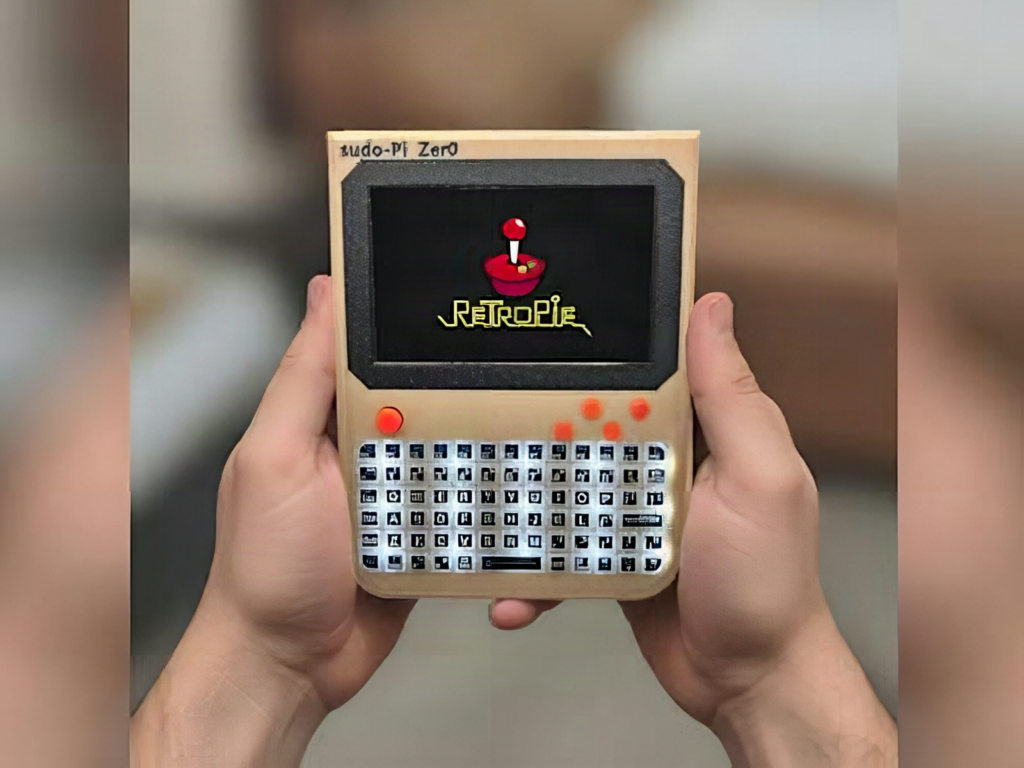
A Raspberry Pi Zero 2 W costs less than a decent mechanical keyboard, but the moment you want to use one away from a desk you need a monitor, a USB keyboard, and a wall outlet. That gap is what makes the Sudo-Pi Zer0 from maker Signals Circuits worth a look. It folds the screen, keyboard, battery, and port expansion into a single handheld body, which turns the Pi into something you can carry to a robotics lab or a hallway debugging session.
What Signals Circuits built
The Sudo-Pi Zer0 is a portrait-format handheld: a 5-inch display sitting above an ortholinear keyboard, with a thumbstick standing in for a mouse. The maker designed the entire stack from scratch rather than bolting together off-the-shelf HATs. That means a custom carrier PCB, a separate keyboard PCB, the power system, a USB hub, the audio circuit, the display interface, and the enclosure. Carrier and keyboard schematics are already published, an open source license is promised, and kits are planned for people who would rather not source sixty-odd parts one at a time.
What is actually inside
The Zero 2 W brings a quad-core Arm Cortex-A53 clocked to 1GHz and 512MB of SDRAM, which is enough for a terminal, Python, and light desktop work. Its weakness is connectivity: one micro-USB OTG port, one mini-HDMI output, one CSI-2 camera connector. The carrier board patches around that with an onboard USB hub feeding two external USB ports, an amplified speaker with a headphone output, and a STEMMA QT / Qwiic connector so you can hang I2C sensors off SDA and SCL with no soldering. The full 40-pin GPIO header stays exposed. An internal battery charges over USB Type-C and drives both the Pi and the display through a custom power management circuit. A teased expansion module adds GNSS, cellular, and LoRa radios.
Build your own version
Start smaller than the finished handheld. Wire a Zero 2 W to a 5-inch DSI or HDMI panel, plug in a USB keyboard, and get the software stable first. A read-only root filesystem and a lightweight window manager will save you a corrupted microSD card three weekends from now. Then move power onto a TP4056 charger and a 5V boost module, and measure real current draw with a USB meter before you pick a cell. A Zero 2 W idles near 150mA and can spike past 400mA when all four cores wake up, and that number sizes your battery. The keyboard PCB is the trickiest piece, so study a published one before routing your own. Full build details and links to the schematics are on the Hackster writeup.
Frequently Asked Questions
What single-board computer powers the Sudo-Pi Zer0?
A Raspberry Pi Zero 2 W, with a quad-core Arm Cortex-A53 running at up to 1GHz and 512MB of SDRAM. A custom carrier board adds the ports the Zero 2 W lacks, including a USB hub, audio output and a STEMMA QT / Qwiic connector, while keeping the 40-pin GPIO header exposed.
How hard is this build, and what parts does it need?
It is an advanced build. Beyond the Pi you need a custom carrier PCB, a separate keyboard PCB with switches, a 5-inch display, a USB hub IC, an audio amplifier, a lithium cell with USB-C charging, and an enclosure. Signals Circuits has published the carrier and keyboard schematics and plans to sell kits, so you can start from those files instead of routing boards from scratch.
What will I learn if I build this?
Quite a lot of practical embedded skills: schematic capture and PCB routing, lithium charging and 5V boost power design, USB hub wiring, I2C addressing over SDA and SCL, keyboard matrix scanning, and Linux configuration on a headless board. It is a strong capstone or thesis project because it forces hardware and software to meet in one working device.
