
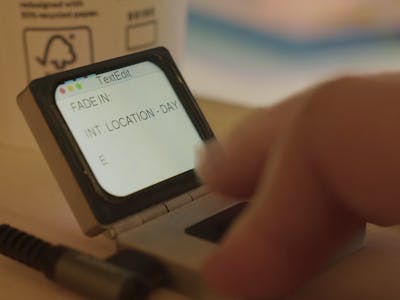
Joke hardware keeps turning into a serious way to learn embedded firmware. Makers have spent the last few years rebuilding gadgets that only ever existed in ads, films and cartoons, and the results keep landing harder than the punchline. A fake product hands you a fixed spec sheet you cannot argue with, which is exactly the constraint most hobby projects lack. Tucker Osman’s Mactini is the sharpest example yet, and its parts list reads like a semester of coursework.
The build
The Mactini began as a spoof Apple commercial nearly 20 years ago, advertising a computer so small it shipped with a single input key. Osman built the real thing around a Waveshare RP2350 board, a color SPI display, a heap of salvaged parts and a printed shell. Speakers pulled from dead iPads handle audio, driven by an amplifier board harvested from a water-damaged security camera. Even the illuminated logo reuses diffuser layers cut out of broken third-generation iPod nano screens.
The one-key interface is the clever bit. Instead of a tactile switch, Osman made a capacitive pad from conductive filament, then wrote firmware that measures how long each press lasts and how much time passes between taps, sorting every interval into short, medium or long. When you pause, the finished rhythm is matched against a lookup table that resolves to a letter, a punctuation mark or a system command. Morse code with extra steps, and it works.
The technical takeaway
Two decisions here are worth stealing for your own project. Pushing every pixel through the CPU choked the display, so Osman moved screen writes to DMA and let the transfer run in the background while the cores got on with other work. Then, once gesture recognition, rendering and audio all shared one super loop, input lag crept in; splitting them into separate FreeRTOS tasks cleared it up. The RP2350 has headroom for that approach, with dual Cortex-M33 cores at 150 MHz, 520 KB of on-chip SRAM and 12 PIO state machines ready to bit-bang whatever protocol your display expects.
The ceiling shows too. The chip has no hardware video decoding, so a 90-second clip had to be converted to Motion JPEG, and it plays back at 12 fps.
What to try next
You do not need the whole Mactini to get the lesson out of it. Wire a 1.3-inch SPI display to a Pico 2, render a frame counter inside a plain loop, then move the buffer transfer to DMA and time both versions. The difference is obvious on a scope or even a serial print. Add a second task under FreeRTOS after that and watch the jitter drop. If your screen stays dark, check that CS and DC sit on the pins your driver library actually expects, because that one costs every student an afternoon. Full build writeup at Hackster.
Frequently Asked Questions
What microcontroller runs the Mactini?
A Waveshare RP2350 board. The RP2350 pairs dual Cortex-M33 cores at 150 MHz with 520 KB of on-chip SRAM and 12 PIO state machines, which is enough to drive a color SPI display over DMA while FreeRTOS juggles input and audio in the background.
How does a computer with only one button let you type?
The single key is a capacitive pad made from conductive filament. The firmware times how long each tap lasts and how long the gaps between taps run, buckets each interval as short, medium or long, and matches the finished rhythm against a lookup table of letters, punctuation and system commands.
What will I learn if I build this?
Four skills that transfer straight to thesis and capstone work: driving an SPI display with DMA instead of blocking the CPU, splitting a laggy super loop into FreeRTOS tasks, reading capacitive touch reliably in firmware, and salvaging usable parts from dead consumer electronics. The DMA and RTOS pieces in particular are what separate a demo that stutters from one that feels finished.
