
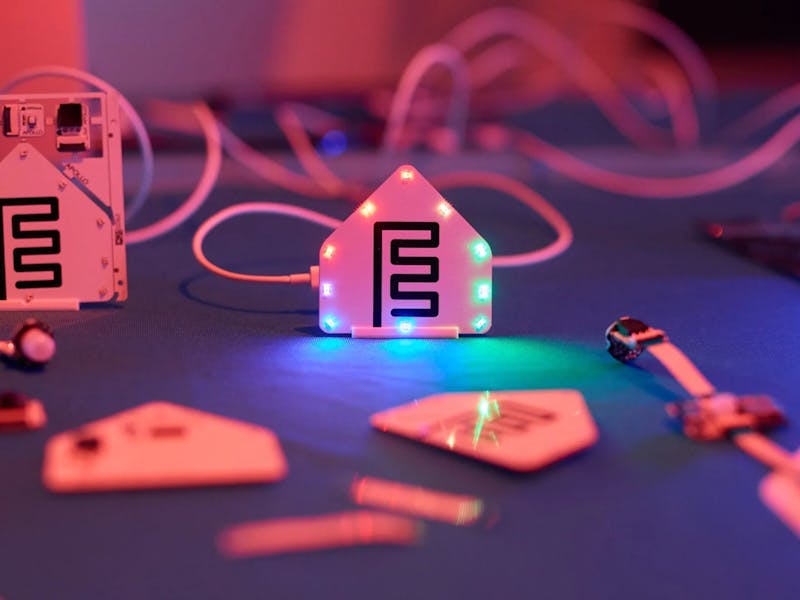
Local-first home automation has quietly become the default in maker circles. Home Assistant installs keep climbing, Thread and Matter radios now ship on modules that cost less than a jeepney fare, and plenty of people who bought cloud-tethered sensors in 2020 are ripping them back out. What the scene never had was a clean on-ramp: a box you can hand a first-year ECE student that becomes a working sensor node before the coffee goes cold. Apollo Automation and the Open Home Foundation just shipped one for $40.
What lands in the box
The ESPHome Starter Kit is built around the ESPHome C6 Board, an Espressif ESP32-C6-MINI-1 module carrying 2.4 GHz Wi-Fi 6, Bluetooth LE and Thread on one die, with Zigbee reachable at chip level if you go digging. Power comes over USB-C, and there is a header for an optional LiPo when you want the node off mains. Four modules ride along: an MH-SR602 PIR that catches motion out to 3.5 m, an AHT20F temperature and humidity sensor rated to ±0.3 °C and ±2% RH, a plain button, and the Casita notification module, which pairs ten RGB LEDs with a piezo buzzer.
The detail that actually changes things
No breadboard. Instead of running jumpers to GPIO pins, the board carries two 14-pin FPC connectors, and modules clip in over ribbon cable with two able to run at once. Configuration happens in the ESPHome Device Builder desktop app through a visual editor, so nobody needs to hand-write YAML or open the Arduino IDE to get a first reading on screen. Everything runs on the local network: no account, no subscription, no cloud round-trip for a motion event. The hardware is open too, with schematics, Gerber files and the stock YAML published, which means the moment the visual editor stops being enough you drop into the config file and keep going. That escape hatch is what most beginner kits are missing.
Where to take it next
Point the PIR at a classroom door and let Home Assistant log occupancy for a week; that is a capstone data set, not a toy. Or wire the AHT20F reading to a relay and build the humidity-triggered exhaust fan every Manila dorm room needs by April. If you already own a bare ESP32-C6 dev board, you do not need the kit at all, since the same ESPHome config runs on it. You just solder the AHT20 to SDA and SCL yourself and add a 4.7 kΩ pull-up on each line if your breakout does not include them. Kit details and pricing are in the Hackster writeup, and the YAML reference at esphome.io covers the syntax once you outgrow the editor.
Frequently Asked Questions
Which sensors are included in the ESPHome Starter Kit?
Four modules: an MH-SR602 PIR with roughly 3.5 m of motion range, an AHT20F temperature and humidity sensor accurate to about ±0.3 °C and ±2% RH, a button module, and the Casita notification module with ten RGB LEDs and a piezo buzzer. They connect to the ESPHome C6 board over 14-pin FPC ribbon cable, two at a time.
Do I need to know YAML or C++ to use it?
No. The ESPHome Device Builder desktop app has a visual editor that generates the config for you, so a first sensor reading needs no code. The generated YAML is still there when you want it, and the schematics and Gerber files are open source, so you can move to hand-edited configs or custom modules whenever you are ready.
What will I learn if I build this?
You pick up the shape of a real IoT node: how an ESP32-C6 joins Wi-Fi 6 or Thread, how I2C sensors report temperature and humidity, and how an automation rule turns a PIR event into an action in Home Assistant. Because everything runs locally, you also see why data privacy and network topology matter, which is useful material for a thesis or a school automation project.
