
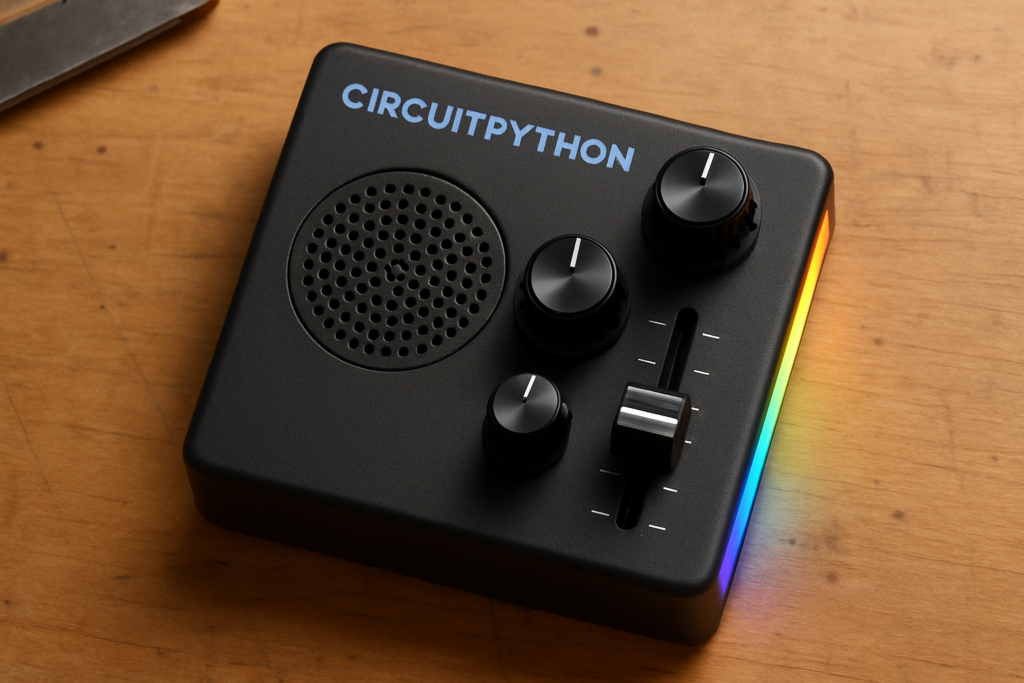
Press record, say a few words into the mic, and let go. A heartbeat later your own voice loops back, slowed down and drenched in echo, sitting somewhere between a cartoon chipmunk and a haunted shortwave radio. That reaction is the whole point of Voicebox FX, a palm-sized audio toy that Adafruit just published a full build guide for.
What they built
Voicebox FX records a short clip, up to 20 seconds, then plays it back on a loop while you mangle it live. A slider bends the pitch up or down. Two rotary potentiometers set the amount of reverb and delay, so a flick of the wrist takes you from a soft room sound to a runaway feedback wash. There is a built-in speaker, a strip of NeoPixels for visual feedback, and a 2200mAh rechargeable battery, so the whole thing runs untethered and fits in one hand.
How they built it
The brain is an Adafruit Feather RP2350, the newer sibling to the RP2040, with dual Arm Cortex-M33 cores that clock up to 150 MHz. Audio arrives through an I2S microphone and leaves through an I2S amplifier. Both are digital interfaces that hang off a handful of GPIO pins instead of noisy analog wiring, which is a big part of why the playback stays clean. The firmware is CircuitPython, so the recording buffer, the effects math, and the potentiometer reads are all plain Python you can open and edit on the board itself. Want a longer delay tail or a different NeoPixel color while recording? Change a couple of lines, save, done. No compiler, no re-flashing toolchain.
Why it is worth your bench time
For an ECE or STEM student, Voicebox FX folds three real lessons into one weekend. You get digital audio over I2S, live signal processing on a microcontroller, and analog control reads that do not jitter every time you nudge a knob. The parts are cheap and none of it needs a breadboard packed with op-amps. Grab the full parts list and wiring diagram from the Adafruit Learn guide at https://learn.adafruit.com/voicebox-fx, and if your first recording sounds thin or crackly, check that both I2S devices share the same bit-clock pin before you start blaming the effects.
Frequently Asked Questions
How does Voicebox FX change the sound in real time?
A slider shifts the playback pitch, and two rotary potentiometers control a reverb and a delay/echo. All three are read continuously in CircuitPython, so the effects update as you turn them during the 20-second loop.
What are the main parts and roughly what does it cost to build?
The core is an Adafruit Feather RP2350 with an I2S microphone, an I2S amplifier, a small speaker, NeoPixels, three potentiometers and a 2200mAh battery. It is a modest parts bill, and Circuit.Rocks carries the boards and I2S audio modules locally so you can price it in pesos.
What will I learn if I build this?
You will practice wiring and reading I2S digital audio, doing live signal processing on a microcontroller, and reading analog controls cleanly. It is a compact way to pick up embedded audio skills that transfer straight to bigger CircuitPython and thesis projects.
