
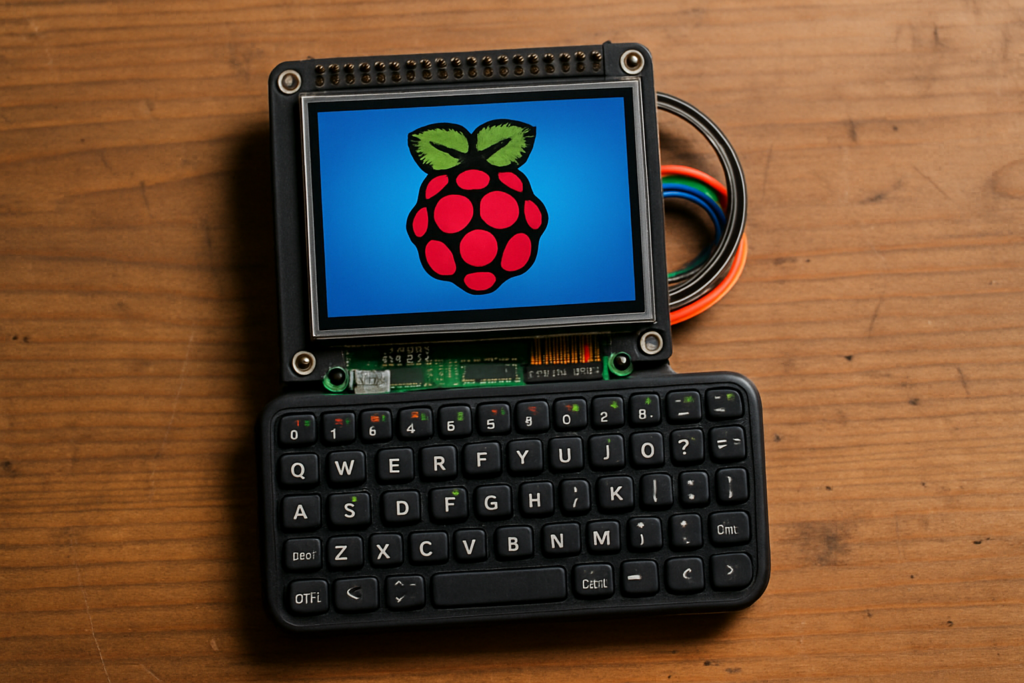
Pocket cyberdecks are having a moment. The idea is simple: take a full Linux computer, bolt on a tiny screen and keyboard, and shrink the whole thing until it slips into a jacket pocket. Designer ndejongh’s latest build lands right in that trend, wrapping a Raspberry Pi Zero (or Zero 2 W) around a 3.5-inch display and a thumb keyboard for a handheld you can actually pocket.
The build itself
At the core sits a Pi Zero 2 W, a quad-core board that runs at 1GHz with 512MB of RAM. That is enough to boot a lightweight Raspberry Pi OS desktop, run a terminal, or drive a Python script in the field. The 3.5-inch screen mounts directly on the 40-pin GPIO header rather than HDMI, so the display and the Pi stack into one slab. A Rii miniature keyboard plugs into the Zero’s USB port through an OTG adapter, giving you real keys instead of an on-screen fumble. The printed shell is the only 3D-printed part; the designer also posted a Pi 5 and Pi 4 variant for anyone who wants more horsepower.
The technical takeaway
The tricky bit with any GPIO-connected screen is that it talks over SPI, not the Pi’s normal video pipeline. A bare 480×320 panel shows nothing until you enable the right device-tree overlay and point a framebuffer copy tool at it, so the desktop actually renders on the small screen. Get the overlay wrong and you stare at a white rectangle, a classic first-boot gotcha. Once the config is set, the same 40 pins that carry the display data also leave a few GPIO lines free for a battery gauge or a power button, which is how most cyberdeck builders squeeze in extras.
What to try next
Grab the printable files from the designer’s MakerWorld page at makerworld.com, then start with the Pi Zero 2 W and a 3.5-inch SPI display, both stocked at circuit.rocks. If your screen stays blank on first boot, swap the device-tree overlay to match your panel’s controller before you touch anything else. From there, a small LiPo and a boost converter turn it into a truly untethered pocket terminal.
Frequently Asked Questions
What Raspberry Pi does this cyberdeck use?
How does the 3.5-inch display connect?
The screen sits on the 40-pin GPIO header and talks over SPI rather than HDMI. You enable a device-tree overlay and a framebuffer copy tool so the Raspberry Pi OS desktop renders on the small 480×320 panel.
What will I learn if I build this?
You practice configuring SPI displays and device-tree overlays, wiring a GPIO header, and setting up a headless-to-handheld Linux system. Those skills carry straight into embedded and IoT projects.
