
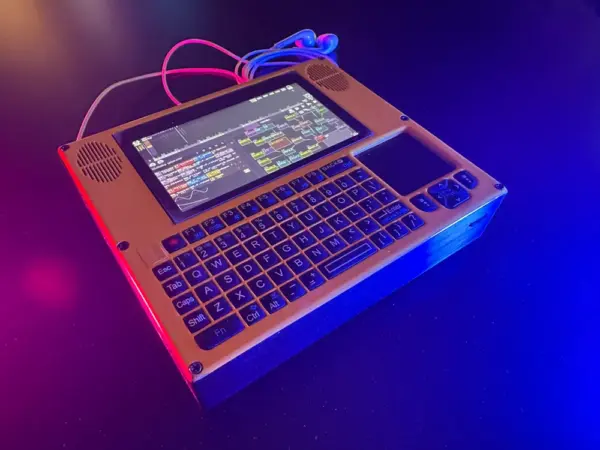
Got a spare weekend and a Raspberry Pi gathering dust? Maker chrisicksix’s cyberdeck is the kind of build you start on a Saturday morning and end up playing music on by Sunday night. It crams a full portable studio into a chunky handheld shell, and there are two build paths depending on how brave you feel with a soldering iron.
What’s inside the deck
At its heart sits a Raspberry Pi 4 handling the Linux side, paired with a Teensy 4.1 running the M8 headless tracker firmware. That combo turns the deck into a standalone groovebox — no laptop required. An 800×480 Waveshare DSI display shows the tracker interface, a 10,000mAh cell keeps it alive away from the wall, and a Rii Mini X1 keyboard handles input. The clever twist: the QWERTY rows double as piano keys, so you can tap out melodies without any extra hardware. Everything tucks into a printed enclosure that keeps the screen, battery, and boards in one pocketable package.
Parts and cost reality
None of this is exotic, which is what makes it a realistic weekend target. Here’s the core shopping list:
- Raspberry Pi 4 (2GB is plenty for headless M8)
- Teensy 4.1 to run the tracker firmware
- 800×480 Waveshare DSI touchscreen
- 10,000mAh battery pack plus a boost/charge board
- Rii Mini X1 wireless keyboard
The maker offers a no-solder “easy” route for first-timers and a “pro” route with soldering for a cleaner internal layout and better cable management. Either way, the printed shell just holds things together — the interesting work is all electronics: power routing, display drivers, and getting two microcontrollers to cooperate.
Spend your Sunday on this
If you’ve been meaning to learn how audio trackers work, or you just want a pocket instrument that boots straight into music, this is a satisfying two-day project. Start by flashing the M8 firmware to the Teensy, get the Pi talking to the DSI screen over the ribbon cable, then wire up power last so you can test each stage safely. By the time the weekend’s over you’ll have a gig-ready mini workstation on your bench and a much better feel for how these boards actually play together.
Frequently Asked Questions
What runs the music software on this cyberdeck?
A Teensy 4.1 runs the headless M8 tracker firmware while a Raspberry Pi 4 handles the Linux side and drives the display, so the two boards split the workload between the sequencer and the interface.
What parts do I need to build it?
The core list is a Raspberry Pi 4, a Teensy 4.1, an 800×480 Waveshare DSI screen, a 10,000mAh battery with a charge/boost board, and a Rii Mini X1 keyboard. There is a no-solder path and a soldered path for a tidier build.
What will I learn if I build this?
You’ll practice flashing microcontroller firmware, wiring a DSI display to a Raspberry Pi, managing portable power with a boost/charge board, and integrating two boards into one device — solid embedded and audio-electronics skills for a thesis or capstone project.
