
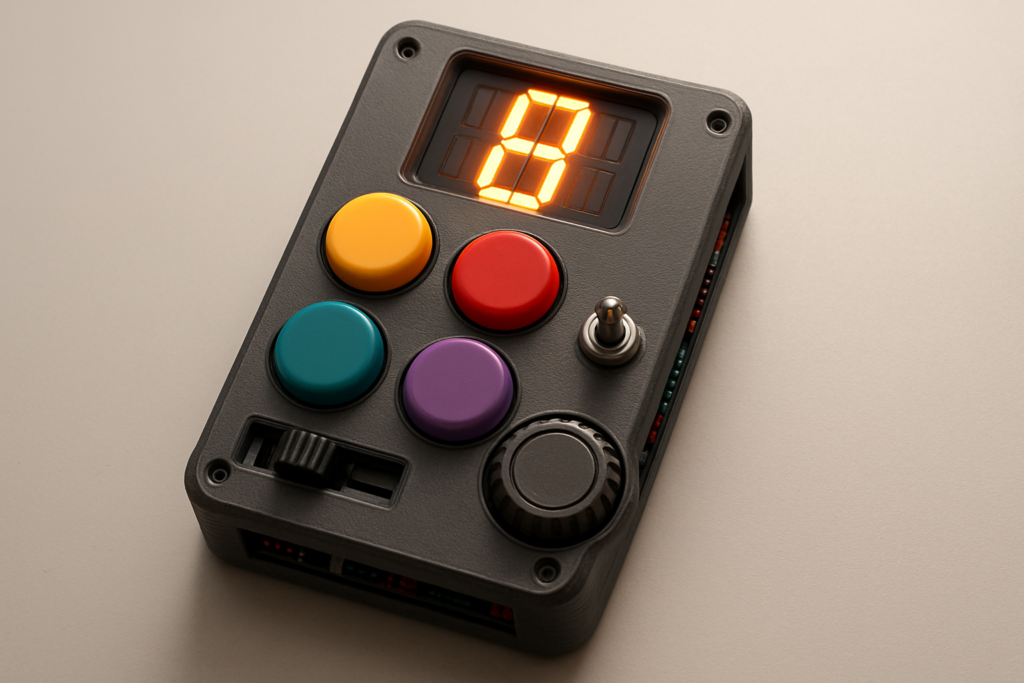
Picture the chaos of a 90s living room: someone shouting commands at a plastic gadget that barks orders faster than anyone can possibly follow. One maker decided that particular brand of nostalgia deserved a glow-up, and rebuilt the whole frantic toy from scratch with modern electronics tucked inside a 3D printed shell.
What they built
The result is a handheld reaction game that fires off five randomized commands — push, slide, flip, shake, and spin — and dares you to nail each one before the timer runs out. A 14-segment alphanumeric display calls the next move and tracks your running score, while a mini speaker pumps out music and snappy sound effects. A NeoPixel stick works as a countdown bar that drains as your reaction window closes, so the pressure is visible as well as audible. The whole thing lives inside a retro-future enclosure printed to look like it fell out of an alternate-timeline toy aisle, and the layout keeps every control within thumb’s reach for genuinely fast play.
How they built it
The brains is the Feather RP2040 PropMaker running CircuitPython, a board purpose-built for props with audio and addressable LED support baked right in. Each move maps to its own physical input:
- Push → a key switch
- Slide → a slide potentiometer
- Flip → a toggle switch
- Shake → an accelerometer
- Spin → a hall effect sensor reading a magnet on a ball-bearing spin wheel
A rechargeable 2200mAh cylindrical battery keeps it portable, and that magnet-activated spin wheel delivers the satisfying tactile click that sells the arcade illusion. Because the PropMaker handles sound and lighting natively, the wiring stays surprisingly tidy for a project juggling this many inputs at once.
The takeaway
What makes this build sing is how it turns five dead-simple sensors into one cohesive toy. None of the parts are exotic — the magic is in the orchestration: random sequencing, timing pressure, audio cues, and lights all firing together in rhythm. It is a good reminder that a memorable maker project is often less about rare components and more about clever choreography. Grab a Feather, a handful of sensors, and a free weekend, and you have your own pocket-sized chaos machine ready to torment your friends.
Frequently Asked Questions
What microcontroller powers the Prop It game?
It runs on the Feather RP2040 PropMaker using CircuitPython. That board is built for prop projects, with onboard audio amplification and addressable LED (NeoPixel) support, so it can drive the speaker and light effects without extra driver boards.
Which sensors detect the five different game moves?
Each command maps to its own input: a key switch for push, a slide potentiometer for slide, a toggle for flip, an accelerometer for shake, and a hall effect sensor reading a magnet on a spin wheel for spin. A 2200mAh battery powers the whole thing.
What will I learn if I build this?
You will get hands-on practice reading multiple sensor types at once, sequencing randomized game logic with timers, driving a 14-segment display and NeoPixels, and playing audio in CircuitPython. You will also pick up 3D enclosure design to package electronics into a finished, handheld product.
